Here is quick post on the item requirement functionality of the project management and accounting module of Microsoft dynamics AX.
The item requirement functionality plays a very important role for the project based organizations who have their own inventory, or have their own production unit for items/sub items which they consume, and don’t want to consume them immediately in the projects.
In today’s post i will give an insight and step by step guide lines to handle item requirements in projects.
The item requirement functionality is basically used for reserving items in the company’s own inventory(a certain amount or unit of items) for a project and then consume when it is needed. Dynamics AX system will then create separate deliveries on each packing slips. This also means that an item requirement can be consumed partially.
It is created and managed as a sales order line on single sales order that is associated with that specific project. It also allows creating purchase orders and production orders from an item requirement.
Follow the steps below to create and process an item requirement in dynamics AX.
- Navigate to Project management and accounting > Common > Projects > All projects
- Select the project.
- Click Manage > New > Item task > Item requirement.
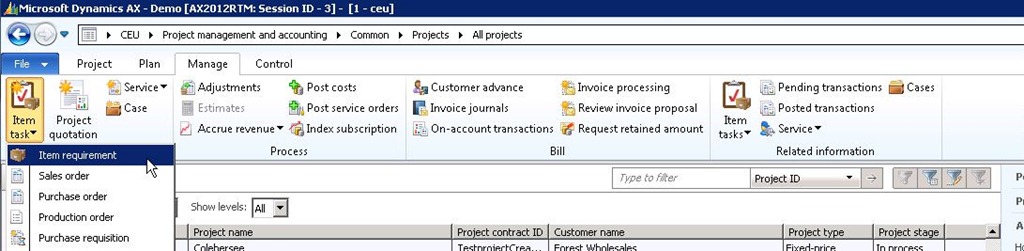
- Create new record and create a line with Item number 1201(Home theater system 2.1) for a quantity of 20.00. If you want to charge this item to the customer in the project,select the line property accordingly.

- Now Notice that it will create a sales order with one line automatically. Screenshot below. Also look the inventory transaction snapshot at this point.
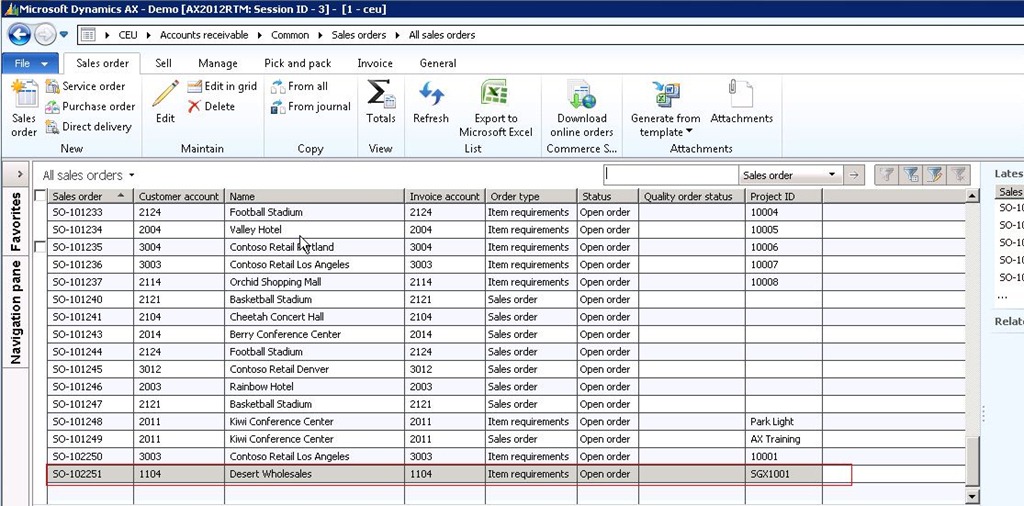

- Now let us pick 20.00 quantities in two iterations(5.00 and 15.00) of the item in the project and post the packing slip. To do this,
- Click Posting > Picking list. Update the same.
- Click Posting > Picking list registration. Update the same.
- Click Posting > Packing slip.
- Now notice that the sales order status is changed to Invoiced.
- Also take a look at the inventory transaction and posted project transaction snapshots.

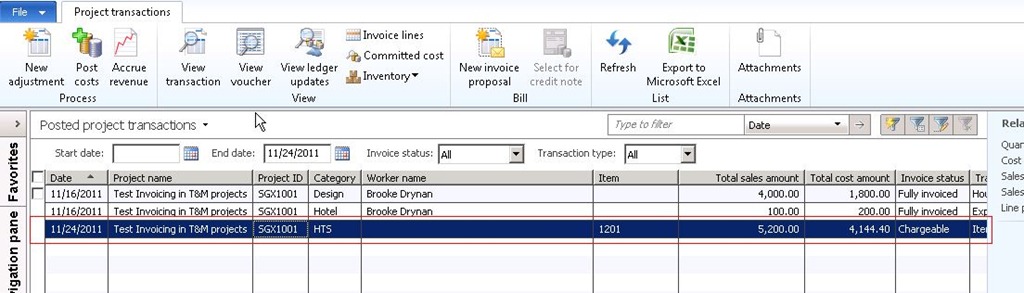
- Finally, if you would like create one more item requirement in the project using the above steps only, you will notice that a new line gets created in the same sales order.

The difference between an inventory item journal and an item requirement in a project is that, an item requirement will be useful when the purpose is not consume items in the project immediately, and rather reserve them in the inventory and consume them partially when needed. Where as an item journal will be preferable to enter and post and quick item consumption in a project.
There are several advantages that users can take when using the item requirements functionality such as the BOM explosion, Net requirements analysis etc.
Please let me know if you need more clarification on this functionality.


 Microsoft Dynamics 365 Blog
Leave a comment