Tag: D365 F&O

  • Does your organization have the right business technology to thrive in the subscription economy? See how Dynamics 365 Finance can help.

    Does your organization have the right business technology to thrive in the subscription economy? See how Dynamics 365 Finance can help.

    In the mobile first cloud first era, B2B and B2C businesses of all sizes are continuously introducing innovative subscription based products and service offerings and are finding new ways to generate recurring revenue to stay relevant in the business. The end goal is get customers subscribed to their services, keep innovating at scale to retain customers and create more predictable revenue streams for their business.

    The subscription model of generating revenue is great for organizations for predictable revenue and cash flow, but it also introduces new challenges for them to keep up with the complex billing and revenue recognition requirements. Organizations are challenged to create unique pricing models and easy & affordable bundling of their subscription offerings for faster customer adoption. This certainly requires them to have sophisticated business technology to manage the complex pricing(flat, tiered, flat tiered etc.), billing, revenue recognition and renewal needs. And of course, they have to stay complaint with the ever evolving regulation requirements around revenue allocations down to item level(specifically comply with ASC 606 and IFRS 15) and also manage revenue expense deferrals to align with US GAAP.

    Here is an example. Company A sells their cloud based software apps and hardware in variety of bundled subscriptions. The pricing model of these bundled offerings can be complex with tiered pricing requirements, based on what the customer subscribes to. For the customer, it is just a convenient subscription for which they pay a fixed fee either upfront annually, or pay them quarterly or monthly and they continue to take advantage of all the innovation Company A does in it’s software and hardware and stay up to date. However, Company A as an organization internally has to have the right business technology/application in order to manage the complex tiered pricing for the bundled contracts and be able to to bill accurately. They also have to allocate revenues to multiple revenue streams and manage the financial obligations and performances.

    The Good news: Dynamics 365 Finance now has the Subscription billing and revenue management capabilities built in the base offerings as part of the Dynamics 365 Finance SKU/license. You no longer need to look for ISVs solutions or external 3rd party apps to manage your subscription business. This new module and the features under it are designed specifically to tackle the billing and revenue management complexities of any subscription business and helps you shorten the quote to cash cycle. It also comes prebuilt with analytics and insights that can help your business leaders to make informed decisions.

    Subscription Management Workspace

    Important Note: Microsoft introduced a standalone Revenue Recognition module back in 2020. The new Subscription management module is much more comprehensive, more capable and it does override the capabilities of the earlier Revenue recognition module. So you will first need to turn OFF the Revenue recognition module in the application before you can enable the new subscription management capabilities.

    The 3 main features of the new Subscription management module are as follows.

    Recurring Contract Billing: This is the heart of the module. This is where you define the structure of the contract and establish key billing parameters such as the customer account, terms, the line items, dates, terms, pricing, item billing type, billing frequency, schedule, requirements for deferrals, renewals , terminations and more. This part of the module lets you create billing schedules for contracts with customers and automate complex pricing and billing processes. It also let’s you produce consolidated invoices for customers with multiple items under their contracts.

    After you have setup the billing schedules, you can view the automatically created billing schedule and associated details at any time. You can setup advanced pricing options, manage escalations and discounts and deferral requirements, putting contract lines on hold and terminations.
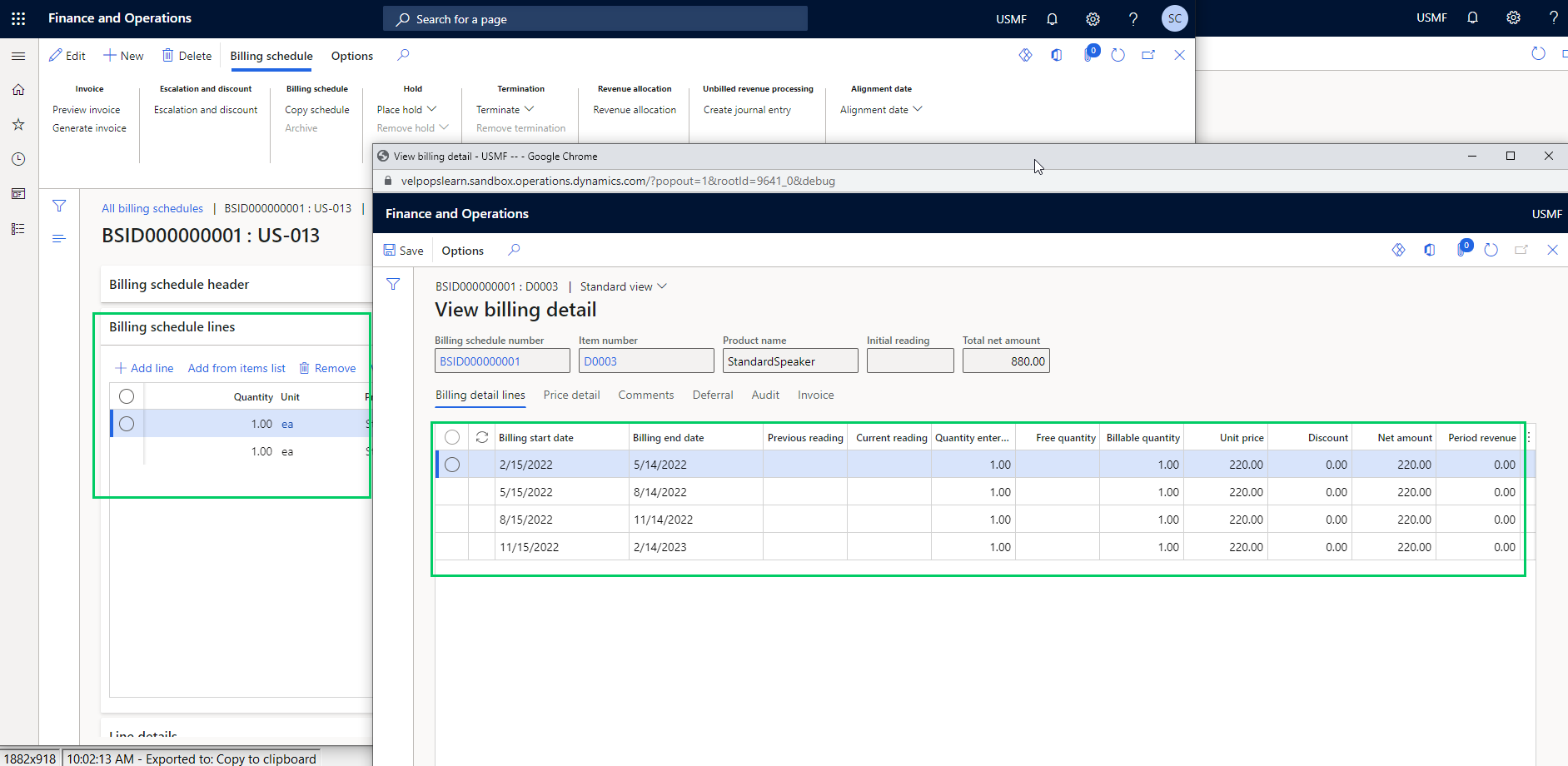
    You can preview invoices by individual lines, or consolidated by item or period prior to creating them and you can also chose what type of transaction to use to create the invoice(Such as Sales order Vs a free text invoice) and you can also chose whether you want to create the invoice lines for additional review or directly post them.

    Revenue Allocation: This part of the module has the functionalities that allows your finance team automate pricing and revenue allocations across multiple items. This also helps organizations that have specifically have to comply with ASC 606 and IFRS 15 standards. This functionality also lets you setup multi element revenue arrangement on contracts and manage those on the billing schedules. We will discuss this topic is greater details in future posts.

    Revenue and Expense deferrals: This functionality allows organizations to manage revenue and expense deferrals to stay compliant with US GAAP standards. In the ever evolving regulations in the subscription economy, this functionality will help your finance teams to use less manual spreadsheets and allows them to manage those directly in the system. You can setup the system to automate the deferrals on variety of source transactions such as Sales orders, purchase orders, general journals, FTI and manual invoice journals. You can chose deferral schedule types such as “Straight line or Event based” on your contract/billing schedule lines and also setup advanced deferral parameters on how you want to manage deferrals of discounts associated with revenues and expenses.
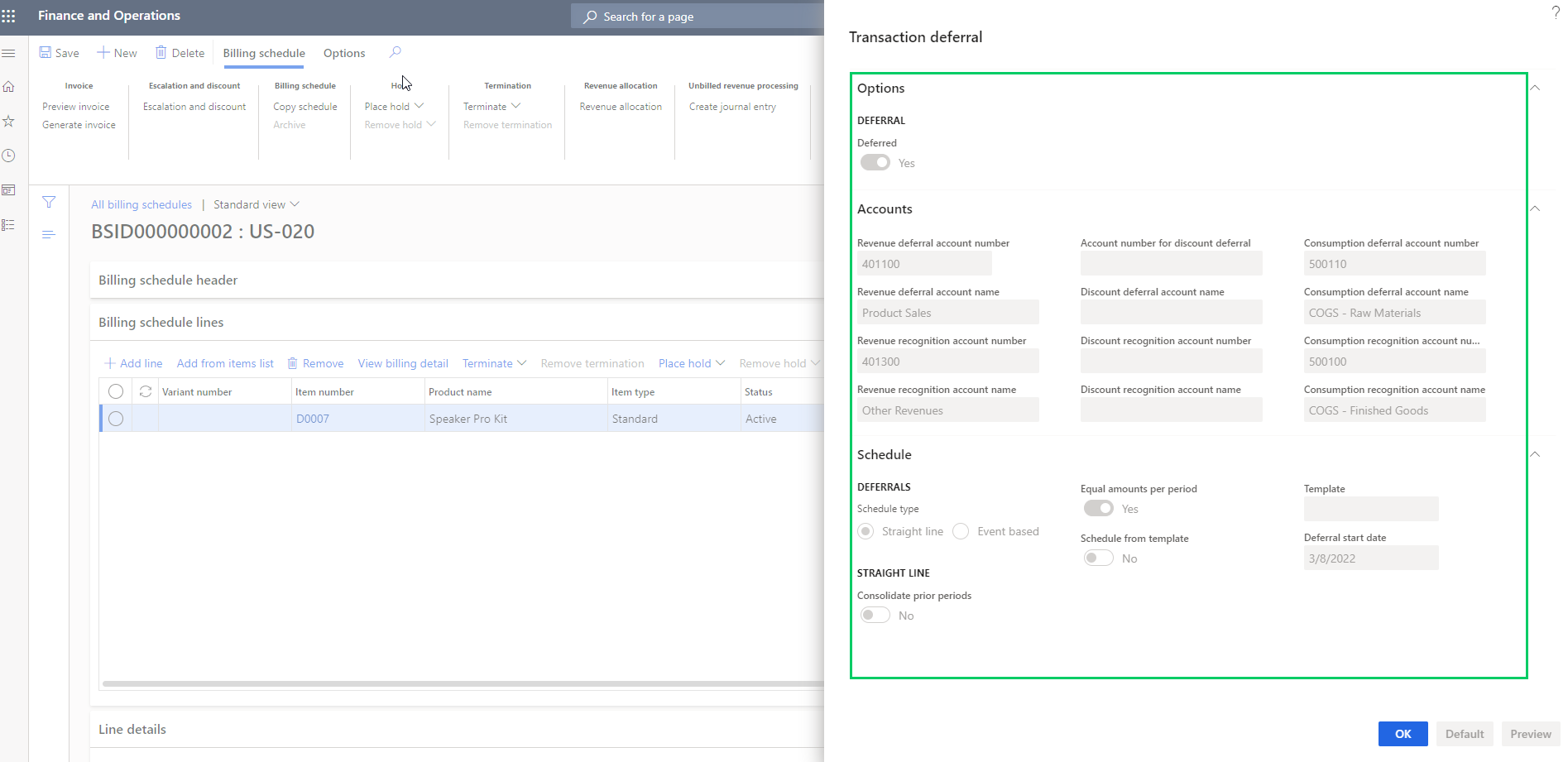
    When you generate the invoices for the billing schedules, the system will automatically create your deferral schedules . You can view the details of the invoice associated with the deferral schedule.

    You can manage deferrals from there on easily.

    That’s it for this post. I just wanted to highlight some of the key capabilities of the new Subscription Billing module in Dynamics 365 Finance and how it can help manage your complex subscription billing and revenue requirements. We will get into details of each of these functionalities, the setups and processes involved in upcoming posts.

    Till then, keep reading.

  • Azure Data Lake(Gen2) integration with Dynamics 365 for Finance and Operations

    Azure Data Lake(Gen2) integration with Dynamics 365 for Finance and Operations

    Business Intelligence and Reporting has evolved in Dynamics 365 Finance and Operations since it’s launch. Entity store is the default relational database for dynamics 365 for finance and operations containing several aggregate measures and customers rely on it for near real time dashboarding on data from the Production database of D365 F&O. Entity store DB is included in the D365 F&O subscription and Microsoft ships quite a few embedded Power BI content packs that does direct query into the entity store to produce stunning dashboards and reports across various modules.

    It is also possible to make the entity store available in Azure Data Lake (Gen2). This gives flexibility for customers to have the aggregate measures of entity store directly in their Azure data lake and allows them to do reporting and dashboarding by mashing up data from external sources also.

    Another popular option used by many customers is BYOD. Customers can export out of the standard data entities and custom data entities and export them in a predefined schedule to their own Azure SQL DB and then use Power BI or other tools to create reports and dashboards and mash-up the data with external systems data as well if needed. While BYOD offers a good solution for reporting and dashboarding by mashing up data from systems other than just D365, F&O, it comes with it’s own limitations and often requires you to manage and maintain the recurring data exports. The Azure SQL storage is also comes at a cost, depending on what volume of data you want to export and store.

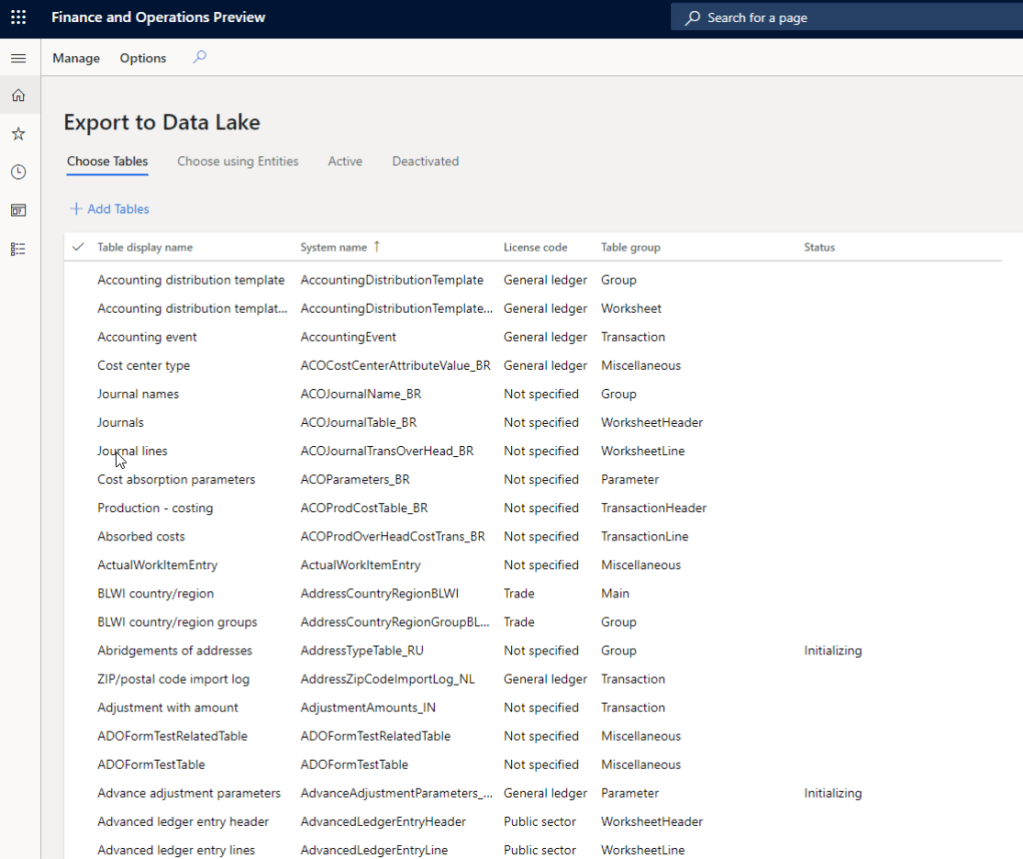
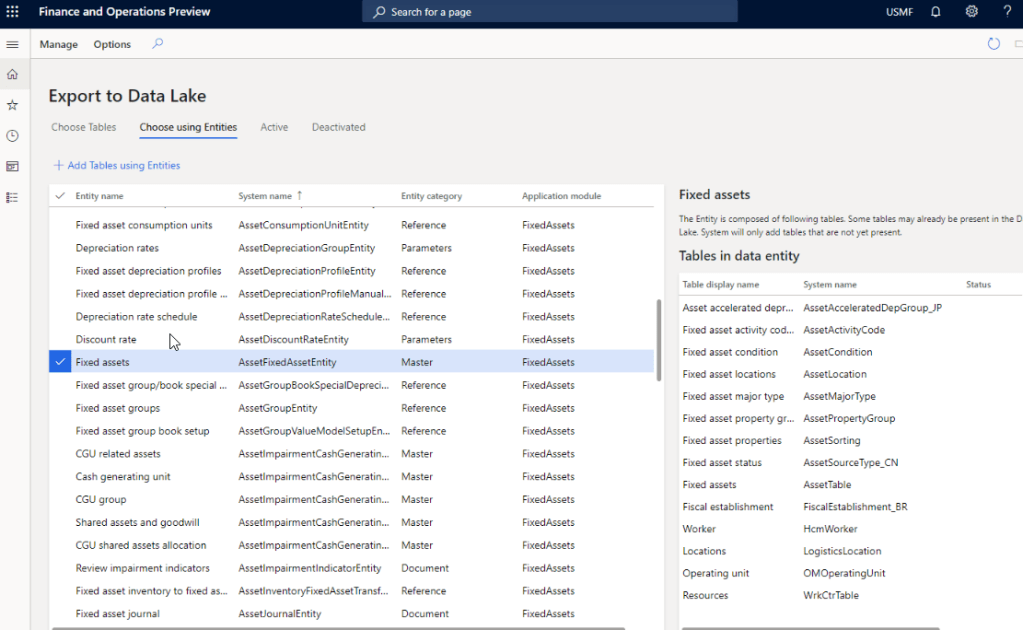
    With the version 10.0.12 launch, Microsoft is now making it possible to replicate you D365 F&O production data into Azure Data Lake (Gen2) storage. This new feature and framework allows you chose the data tables and entities you want to export and will keep the F&O data up to date in Azure Data Lake in almost real time.

    After you setup your Azure data lake storage account, application ID and authorization for D365 F&O to access the storage account you will first need to install the add-in within Lifecycle services(LCS). Then you can enable the new feature within the feature management area of D365 F&O and perform the remainder of the setup.

    Why you should plan the transition to Azure Data Lake: In my view, customers who are invested in BYOD or the analytical workspaces of D365 F&O entity store today should look at taking advantage of Azure Data Lake and should plan the transition for the following reasons.

    1. BYOD requires continuous monitoring and troubleshooting. ADL maintains the data automatically and is always up to date with no intervention needed.
    2. You don’t need to create data entities to expose data in any table that you want. You can literally expose all data tables and fields with ADL integration.
    3. Azure SQL data storage is comparatively expensive than ADL.
    4. ADL cloud storage is more efficient, better for analytics and provides additional capabilities such as AI, and additional programming to transform large volume of data.
    5. Data lakes in Azure are designed for big data and analytics and are capable of handeling big amount of data with less cost. It takes advantage of Azure blob storage behind the scenes.
    6. Data lakes not only allows you to do analytics on the data using Power BI, but also it allows you do additional things like apply machine learning, AI on the data to learn and take meaning and action out of your big data.

    That’s it for today’s post.

  • Additional “Settlement” type transactions on Customer and Vendor transactions page in D365 Finance – Why do you see these and how to fix it?

    Additional “Settlement” type transactions on Customer and Vendor transactions page in D365 Finance – Why do you see these and how to fix it?

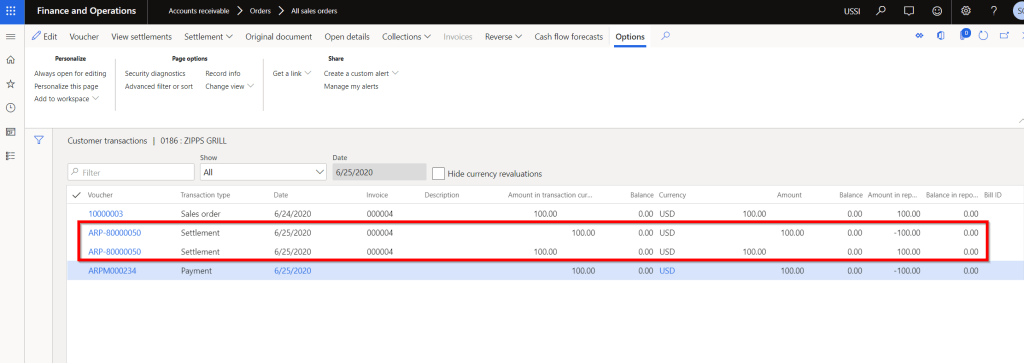
    Here is a quick tip for you all if you ever see additional transaction entries on the Customer or Vendor transaction page with Transaction type = Settlement offsetting each other, when you settle and post a customer payment for an invoice. These additional entries looks something like below.

    Let us understand why the system creates these additional transactions.

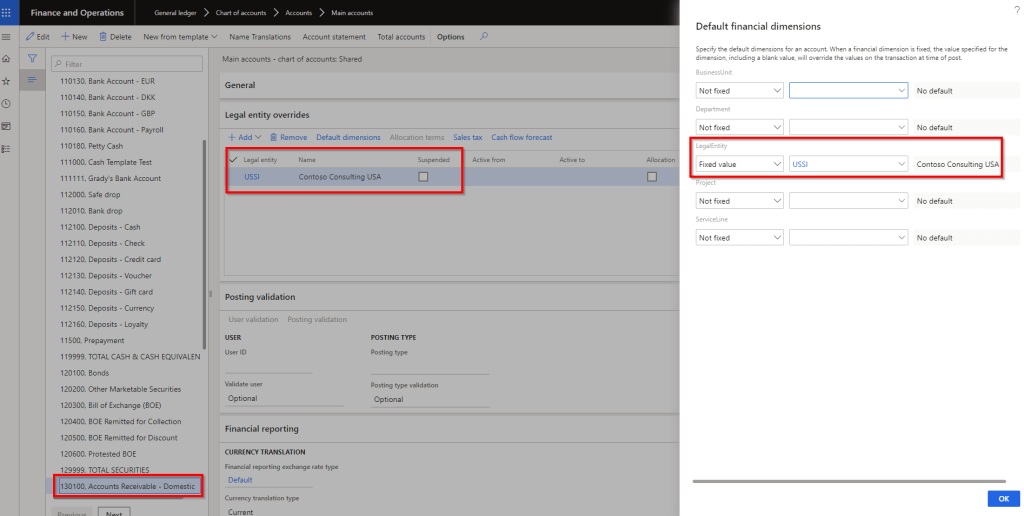
    I have seen in some cases, customers tend to set “Fixed value” for one or more of their financial dimensions, for the Trade AR or AP ledger accounts. They do this to zero-fill a dimension that is not required or in some cases they set it to a fixed value intentionally, for example if Legal entity is a financial dimension, they tend to set this to have a fixed value. Screenshot below shows an example.

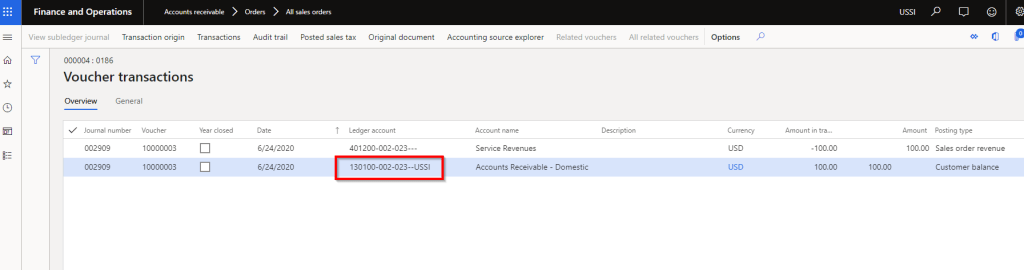
    With this configuration, when you post the customer invoice transaction, the Legal entity financial dimension uses the Fixed value “USSI” on the AR line of the invoice voucher. See screenshot below.

    When you go to settle and post the customer payment for this invoice, here is what the system will do. Since you are doing the cash application(Payment recording) and invoice settlement at the same time, the payment’s accounting entry is not created until the Settlement process is complete behind the scenes. Since the settlement happens first, it basically reconstructs the accounting entry of the payment. It finds the AR main account from the customer posting profile and dimensions are derived from the customer transaction (Payment journal). Since Legal entity is setup as Fixed value dimension and there is no source of this dimension when recording the payment, the system basically determines to create adjusting entries (Debit and credit the same account), since the invoice was posted with fixed legal entity dimension, but the reconstructed payment entry did not have any dimension due to fixed dimension setup(This part is a little technical :)) The settlement process creates this additional entry with the fixed dimension and does not roll back the accounting. This is a standard D365 F behavior.

    So, how do you setup the system so that it does not create those 2 additional settlement type entries? There 3 options.

    1. You can setup the dimension which is setup for Fixed value on the Customer record. In many cases this may not be well suited.
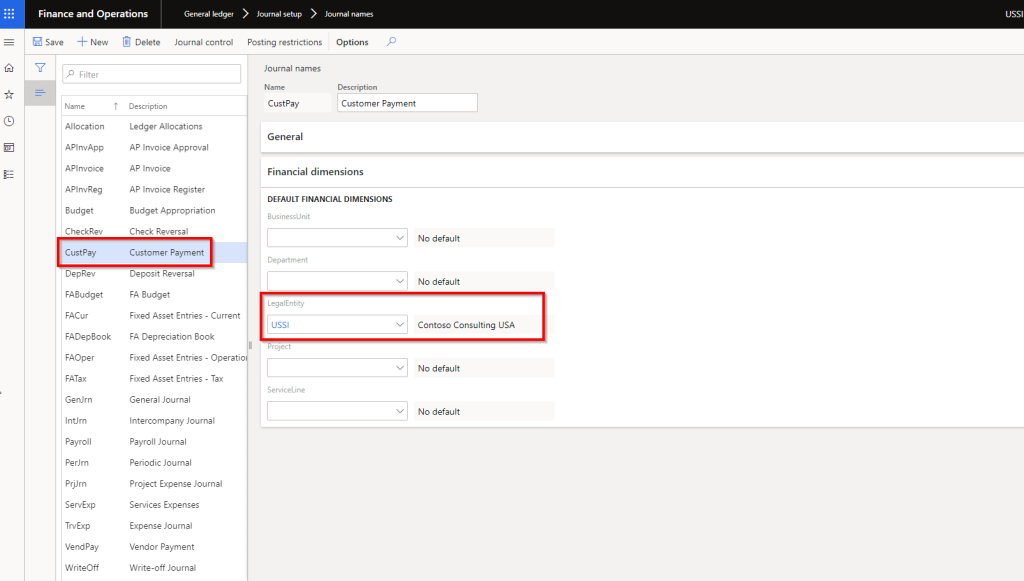
    2. You can setup the financial dimension on the payment journal configuration itself. This is the option I prefer.

    As a 3rd option, you can chose to enter the financial dimension manually on the payment journal line. Not very ideal option!

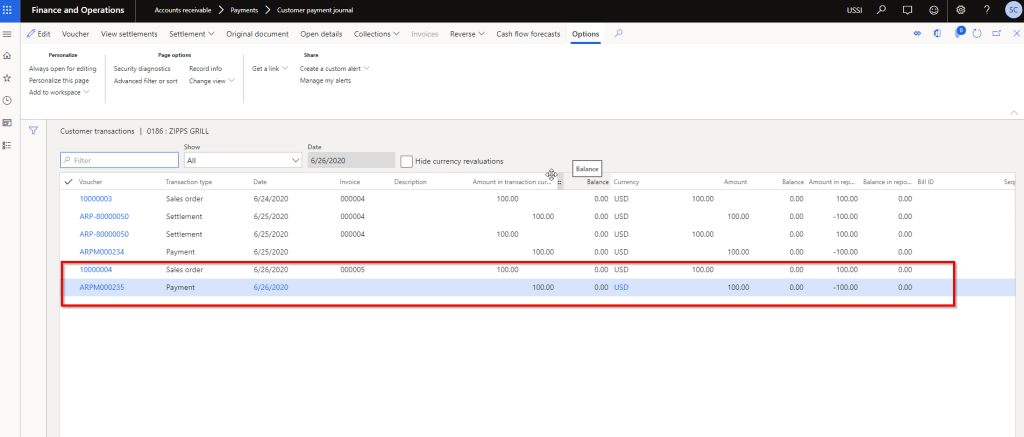
    With the option 2 setup above, if I post a customer payment with settlement of an invoice now, system will NOT create those additional entries on the customer transaction. See screenshot below.

    That’s it about this quick tip. Till next time!!!!