Dear Readers,
In today’s post, let us explore the new work breakdown structure functionality for Projects in Microsoft dynamics AX 2012.

Every professional services organization in today’s competitive world of business, wants to be more accurate in terms of managing each descending level of activities/tasks in the projects they carry out, to manage the costs and revenue efficiently and become more profitable. Breaking down the individual tasks and activities on projects and tracking costs, revenues, managing resources at each task level etc. helps in this.
The work breakdown structure of dynamics AX 2012 is a hierarchical representation of the activities and child activities in a project and helps the project managers to do the following.
- Define the overall work scope of the projects.
- Each descending level of the hierarchy represents increasingly detailed information about the project work.
- It helps identifying and creating milestones in the project.
- It also helps managers to soft/hard commit resources to the activities/tasks.
- Project managers can create WBS templates and use them any time they want to plan a new project. They can also create the WBS directly on a project.
Let us first learn how we can view and create the work breakdown structure template for our organization. The following steps will depict the steps to create new WBS template.
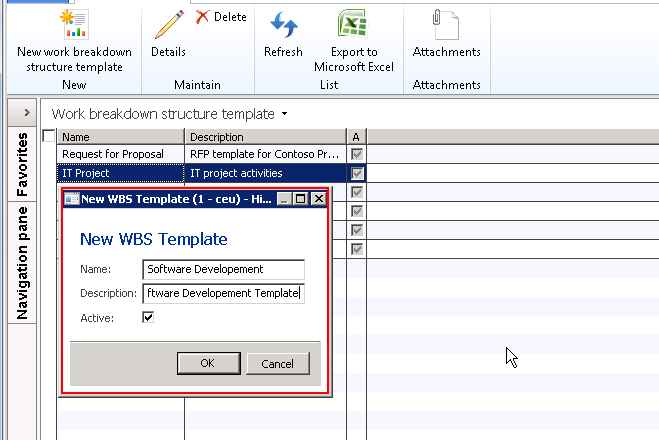
- Navigate to Project Management and Accounting > Common > Activities > Work breakdown structure template.
- Click New > New work breakdown structure template.


3. On the Work breakdown structure details screen, click “New” button to create the hierarchy of activities/tasks in the project.
4. Create Planning as the new activity and click New button again by keeping the focus on this activity. Provide activity name, it’s priority and a brief description about it in the designated fields.

5. On the right hand side, expand the various fast tabs to fill in information about this activity. Expand the Schedule tab and key in the Duration in days, effort in hours, a default category etc. as shown as an example in the screen above.
6. Expand the Activity requirements tab and setup the resource requirements for this activity in terms of Education, skills, certification, experience etc. This information can be used if you want to make use of the resource scheduling functionality of AX 2012.
7. Setup the estimated costs and revenues for this activity by creating new records under this tab.
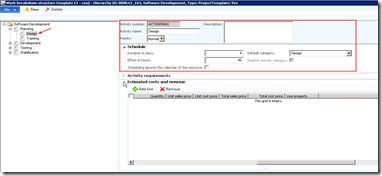
8. Similarly, complete the end to end hierarchy for this WBS template and setup the above explained parameters for each of the activities/tasks.
9. Now that we have created and setup a template for a software development project, let us create a new project and try to use this template in the project to define the task hierarchy for this.
10. For this, create the new project and click Plan tab > Work breakdown structure. Click Copy from button. System will show all the available templates in the system. Select the template and click Ok button.
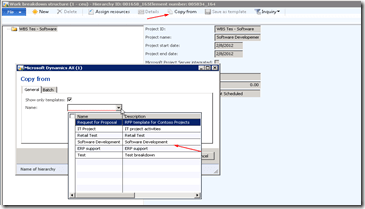
11. System will then load the activity hierarchy structure for the project which you can modify as the current project needs. For example you may wish to assign different resources to the activities and the cost and revenue estimates may be different for this project.
The project manager can also carry out the resource assignment task from the WBS screen and by clicking the Assign resources button.
The project managers can also make use of the WBS right from the project quotations level which will help them in automating most of the project planning tasks such as WBS management, budgeting, resource assignments etc.
Please feel free to ask any queries you have regarding the WBS management for projects in AX 2012 and I will be happy to answer.
Thanks
Keep DAXING 




 Microsoft Dynamics 365 Blog