Friends,
Most of us must be aware of this functionality getting introduced in AX 2012. I will just provide a high level overview of it in this post.
In AX 2009, the expense categories were never shared between legal entities which was clearly a deficiency of AX 09. This functionality will help in may scenarios where in employees of the organization work on requirements of subsidiaries/other legal entities. This will allow them to incur expenses on behalf of the companies which they do not work for.
Let us see the step to setup a shared category in AX 2012 and verify how it can be used across any entity of the enterprise.
- Navigate to Legal entity CEU > Project Management and accounting > Setup > Categories > Shared Categories.
- Create a new record with ID = SharedExpCat and name = Shared expense category.
- Select the “Can be used in Projects”, “Can be used in production”, “Can be used in expense” check boxes to be able to use this shared expense categories in Projects, production and expense respectively.
- Let us select the Expense type as Car rental.
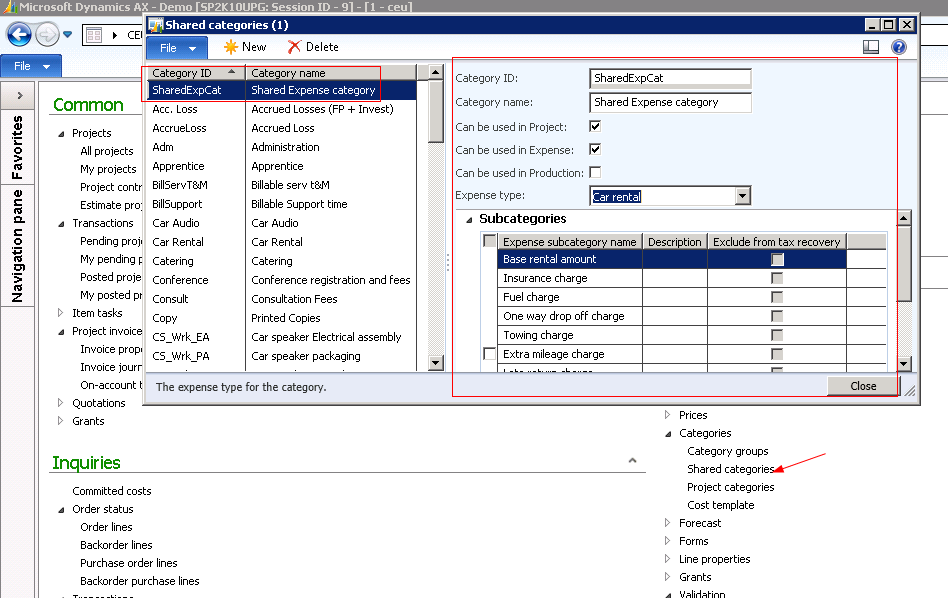
- In AX 2012, we need to define categories in the shared category form before we can create those in the project categories. Once we have the categories defined in the Shared categories screen, they will be available in all the legal entities for use.
- Let me know if you need more information about the shared categories and their usage in AX 2012.
- Thanks
- Keep DAXING


 Microsoft Dynamics 365 Blog
Leave a comment