Friends,
Hope all is well with everyone. It’s been a very long time, I came in here. Was completely occupied with work.
Today, let’s discuss one of the simple yet very powerful features of Microsoft Dynamics AX 2012 called as the Case management.
A “Case” in AX 2012 can be treated as an issue that requires a resolution. A case can be originated from various sources few of which could be as below.
- An helpdesk support ticket(Internal or External).
- Audit cases.
- Human resource cases such as resource onboarding, discipline etc.
- Quality control.
- Product inquiry by customers/parties etc.
Using this most of the members/stake holders of the organization can benefit in one or the other way.
Cases in dynamics AX 2012 can be used to record, update, track, follow up, and close issues that are raised by your customers, vendors, or employees, or that are created through your audit processes.
Once a case is created/registered, a service level agreement (SLA) can be created and assigned to it. The case owner can always find through a list of existing knowledge articles to see if a similar case has already occurred is the past and see for an existing possible solution. For example, when a customer service representatives or an employee create cases, they can find information in knowledge articles about how to work with or resolve a case more efficiently.
Let us now go through overview/high level steps which we can use to create and manage cases in AX 2012.
- The first step in case management will be to define the case processes and the case categories. These are used to group the various issues in cases. Every case in AX 2012 must be attached to a case category. Create the case categories at Sales and Marketing > Setup > Cases > Case categories.
- You can define hierarchical process structure to manage the cases in the case processed form at Sales and Marketing > Setup > Cases > Case Processes. This can help in defining the responsibilities for each activity in the case process, define exit criteria for closing the case.
- After you have done these required setups for the case management, cases can be raised in your system.
- Let us take a look at quick steps in creating a new case.
- Go to Home > Cases > All Cases
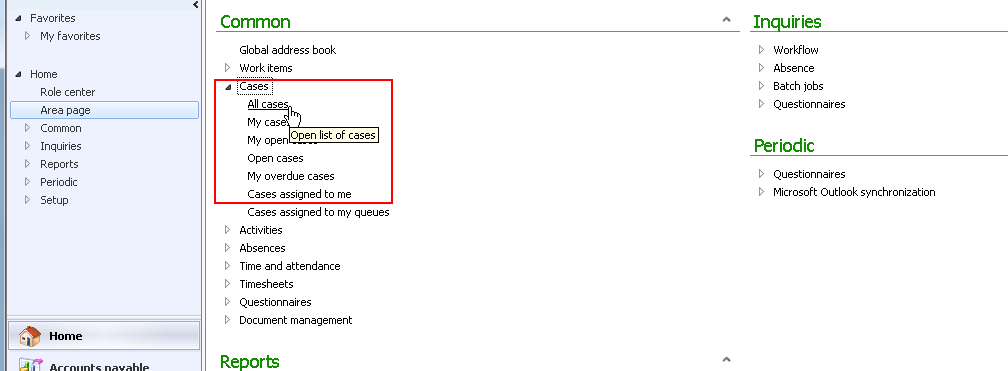
- Create the new case by filling the details as shown in the screenshot below.

This was a very high level introduction about the new exciting feature of dynamics AX 2012. I know you will have questions when you read through this.
Do let me know and I will be glad to answer.
Thanks
Keep DAXING 


 Microsoft Dynamics 365 Blog
Leave a comment