Hi Friends,
In one of my earlier posts, i explained all the new exciting features that are added in the project management and accounting module in Microsoft dynamics AX 2012.
Here, in this post I will explain one of the features which is the project beginning balances.
This new feature will help organizations in transferring projects to Microsoft dynamics AX 2012 from legacy project management systems without affecting the general ledger.
For e.g. , if you have been tracking a project in an outside application but managing costs and revenue in AX , you can transfer the project to AX , specify a beginning balance and then track all information at once place only.
Let us learn how to create and post a beginning balance on a project. Below are the steps.
- The creation and posting of beginning balance transaction is allowed even when the project is in the Created state.
- Navigate to Project management and Accounting > Common > Projects > All Projects.
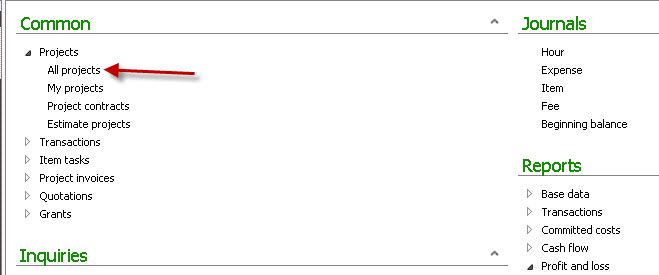
- Click on the New > Projects on the action pane to create the new project.

- Click Setup > beginning balances menu button on the action pane.
- Click New button the action pane.
- Select Begbal as the journal name for the newly created record.
- Click on Lines action pane button.

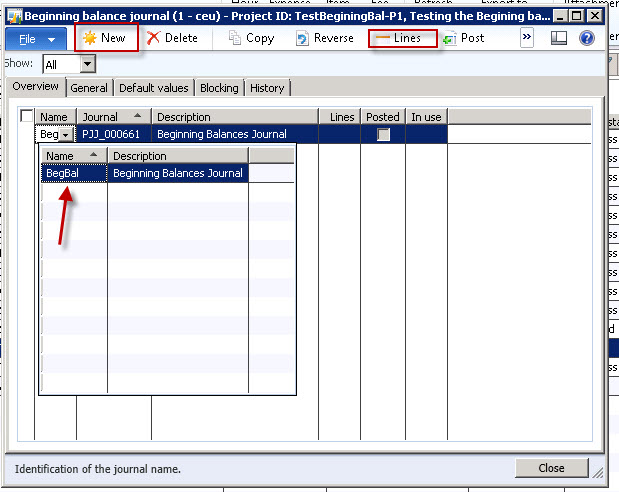
- Create the beginning balance journal lines which can be either Hour/Expense/Item/On Account and Fee type.
- Click the Post button on the action pane. This will post the beginning balances for the project.


Now verify that this posting of the beginning balance has affected the project statements where as the ledger remains unaffected.

Please let me know if you have any questions on this and i will be glad to answer further. ThanksSandeepKeep DAXING :)


Leave a reply to Sandeep Chaudhury Cancel reply