
Hi Friends,
I thought of writing about one of the most talked about enhancements in Microsoft Dynamics AX 2012 which is the employee timesheets functionality in Project Management and Accounting module.
Recording the employee’s times(hours) and expenses is one of the key processes in any services industry today, especially the IT consulting and Management services firms. These firms always look for a timesheet management system in the ERP system which they evaluate for their organization which can make it efficient and easy for their employees to enter their timesheets and expenses.
Microsoft Dynamics AX 2012 empowers the professional services industries with a powerfully simple employee services portal refered to as the Enterprise portal which is based on the Microsoft SharePoint 2010 foundation server, one of the most successful products that MS has released ever.
Now let us discuss about the various capabilities and improvements of the Timesheet system in AX 2012.
Few of the pre requisites for the timesheet functionality to be working are as below.
- Setup timesheet periods. ( Ax 2012 supports Daily, Weekly, Bi-weekly, Semi-monthly and Monthly etc. periods for registering hours/times).
- Setup the project management setup for the workers. ( Employees and Contractors).
- Create required user relations.
- The project management and accounting module setup. (Projects, activities, categories, line properties etc.).
Assuming that all of the above required setups are done, employees of the organization can log into the employee services portal and start entering timesheets.
The Home page of the employee services portal displays role tailored information depending on the user profile/role which is assigned to the employee.
When an employee/contractor who has system administrator role logs into the enterprise portal, the screen looks as shown below. This shows all the various capabilities and functionalities present on the enterprise portal of AX 2012.

However, assuming the case of a typical service industry/IT consulting services industry, where employees (both salaried and hourly based) deal mostly with timesheets, expenses and their approvals, I have customized a role to prepare the employee services portal to look as below. Ax 2012 provides the flexibility of customizing the enterprise portal content the way you want it.

Timesheet Management functionality Highlights in AX 2012:
- Provides flexibility for defining different timesheet periods depending on need.

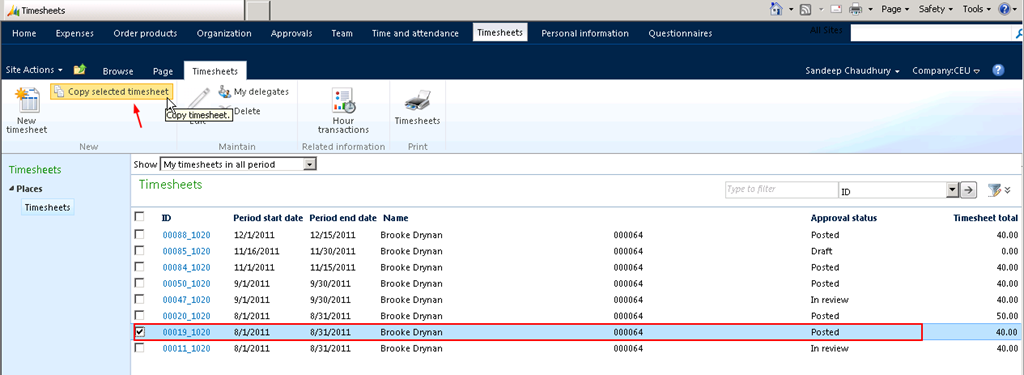
2. Timesheets overview screen displaying details of exiting timesheets.

3. Option to set timesheet favorites/favorite lines and functionality to load timesheet lines
these from favorites.

4. Option to create new timesheet by copying an existing timesheet (Previous).
5. Setup delegates for timesheet submission, who can enter timesheets on your behalf in
your absence and manage your timesheet delegates and timesheet favorites right on the
web enterprise portal.

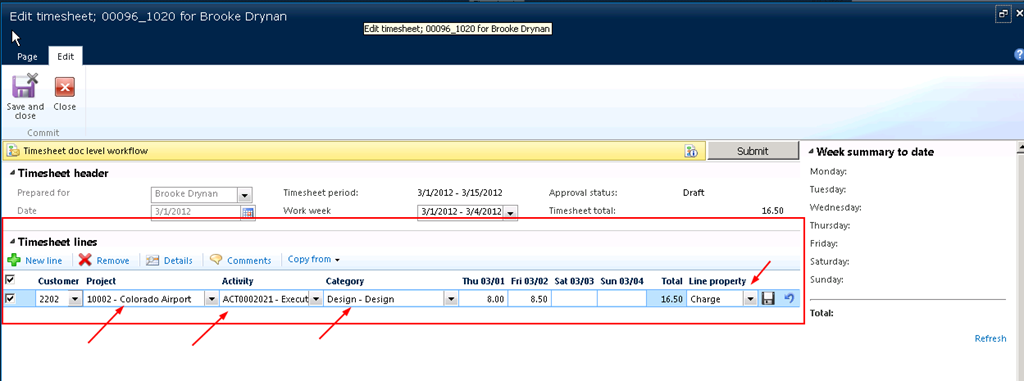
6. Record time on each individual task/activity or the project by entering suitable internal
and external comments for the description of the work. Week summary to date fact box
which displays the total number of hours entered in the week.
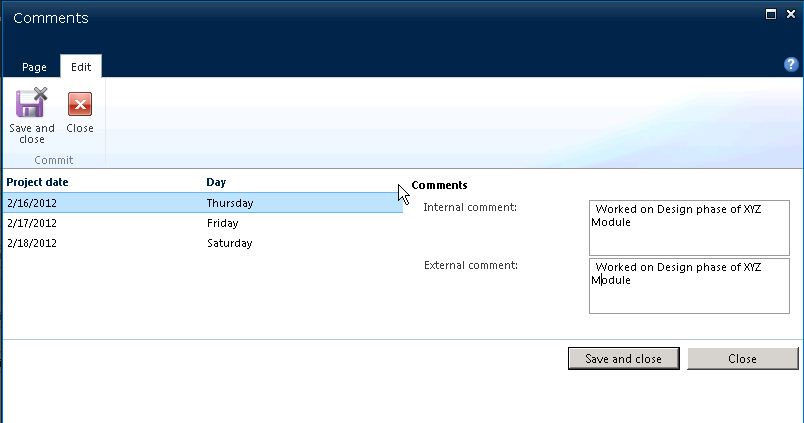
7. Employees will have to spend less time in entering comments for each line with the consolidated comments entry screen.
8. Automatic workflow can be setup for timesheet approval/review. When timesheets are
submitted, they get automatically assigned to the respective reporting manager’s queue
for review.
9. Print your timesheets right from the enterprise portal.


Apart from the timesheets management functionality, the enterprise portal in AX 2012 provided several other powerful business process capabilities and this will definitely help every organization in a very great deal.
Till next time !! Keep exploring. :)


 Microsoft Dynamics 365 Blog
Leave a reply to kamarajuvk Cancel reply