Author: Sandeep Chaudhury

  • Modernizing Your Project Management & Accounting (PMA): Why It’s Time to Upgrade to the Dynamics 365 Project Operations Modern Architecture

    Modernizing Your Project Management & Accounting (PMA): Why It’s Time to Upgrade to the Dynamics 365 Project Operations Modern Architecture

    In the era AI‑powered business applications, project‑based organizations need more than accurate accounting. They need agility, end‑to‑end visibility, and connected processes to deliver profitable and predictable outcomes.

    Many organizations still rely on the legacy Project Management and Accounting (PMA) module in Dynamics 365 Finance & Operations. While PMA has served businesses well for project financial control, it falls short in modern project planning, resource optimization, integrated sales, and collaboration capabilities.

    Microsoft’s modern architecture for Dynamics 365 Project Operations bridges this gap by combining the financial rigor of PMA with next‑generation, AI‑enabled project capabilities built on Dataverse. This evolution is not just a technical upgrade; it’s a strategic shift to future‑proof your business and unlock meaningful efficiency gains.

    This post is for project and service‑based organizations using PMA today who are evaluating their journey toward the modern architecture.

    Organizations still using PMA often face:

    • Fragmented project planning and resource management
    • Limited collaboration across sales, delivery, and finance
    • Outdated and siloed technology
    • Quite a bit of manual processes
    • Limited scalability for modern operating models

    PMA provides strong accounting, but lacks the integrated, AI‑enhanced capabilities needed for today’s project‑centric enterprises.

    Legacy PMA (Your current state)

    • Fully embedded in Finance & Operations
    • Handles project creation, basic scheduling, time & expense, invoicing, and revenue recognition
    • Limited sales integration
    • No modern AI or Dataverse-native capabilities

    Modern Architecture (Your future state)

    • Sales, planning, resource management, and project operations run on Dataverse with Dynamics 365 Project Operations all in one connected flow.
    • Financials, invoicing, and accounting remain in Dynamics 365 F&O
    • Synchronized financials to ERP via out of the box dual-write
    • Enables rich planning, AI, automation, analytics, and collaboration

    This hybrid model gives you the best of both platforms.

    AI powered project planning:

    Built-in Planner P3 capabilities, including Copilot-assisted WBS creation, risk assessments, and status reporting accelerate delivery and improve accuracy.

    Agentic AI Automation

    Intelligent agents reduce operational overhead by automating time & expense entry, approvals, reconciliations, and monitoring.

    Smarter, More Reliable Finance

    Connected processes from Quote → Contract → Project → Revenue Recognition reduce errors, shorten billing cycles, and improve reporting.

    Unified Platform For your Service, Projects and Financial Ops

    Modern planning and resource management on Dataverse works seamlessly with F&O’s proven accounting, connected through dual-write. Out of the box integration of Field Service operations with Projects enables seamless workflows from “field to financials”.

    Low-Risk Transition Path

    Starting in version 10.0.45/10.0.46, Microsoft allows PMA customers to include the same legal entity in the modern architecture.
    You can:

    • Continue and close PMA projects
    • Create new projects in the modern architecture
    • Avoid heavy code or data migration investments

    Future-Ready Foundation with a really well-defined roadmap

    Built on Power Platform, enabling continuous innovation with AI, process automation, and analytics. The roadmap for the modern architecture is compelling with robust features such as change orders, AI agents, what-if analysis and more.

    • AI driven Project Planning with Microsoft Planner P3 built-in: Intuitive, timeline-based planning powered by AI.
    • Unified Resource Management: Seamless resource scheduling and utilization across roles.
    • Modern Contract Structure and Pricing: Richer quoting built on D365 Sales/CRM capabilities and flexible contract modeling and dimension-based pricing with a unified business process flow.
    • Subcontracting: Fully integrated with D365 F&O Procurement providing end- to end capabilities from subcontract modeling, T&E, invoicing with 2-way and 3-way matching and integrated vendor invoicing.
    • Agentic T&E Entry and Approvals Management: Game changing T&E entry and approvals management saving significant time for your resources and PMs.
    • Billing Hub with modern invoicing and KPIs
    • Dual-write Integration out of the box: Real-time syncing of data between Dataverse and F&O out of the box takes the burden off of you where you don’t have to custom integrate your CRM with ERP. This is a HUGE relief for customers where they do not have to maintain the technical debt of custom integrations. Along with all the modern functionality you will get, this alone should be one of the primary drivers for you to consider the move to the modern architecture.
    • D365 Field Service’s native integration with project operations streamlines your service business integrating seamlessly with projects and financials workloads out of the box.

    Starting with the version 10.0.45/10.0.46, if you are using the PMA module to manage your projects under a legal entity in your existing D365 F&O environment, you can include the same legal entity in the modern architecture.

    Microsoft’s goal here is not provide full PMA capabilities and the modern architecture capabilities within the same legal entity in F&O. This functionality of allowing the co-existence of the some of the legacy PMA functionality is primarily to provide customers a path to close out projects they started in the PMA in D365 F&O and create any new projects going forward using the modern architecture.

    This is great news for you as a customer, where you will NOT have to spend time and money on significant technical code migration or data migration efforts to move over to the modern architecture. You will have most of the key functionality/processes you need to close out your PMA projects and then take the opportunity to evaluate your holistic “project to Profit” business processes and take advantages of the functionalities available in the modern architecture for new projects post migration.

    Here are some of the high-level steps of how you can enable this migration.

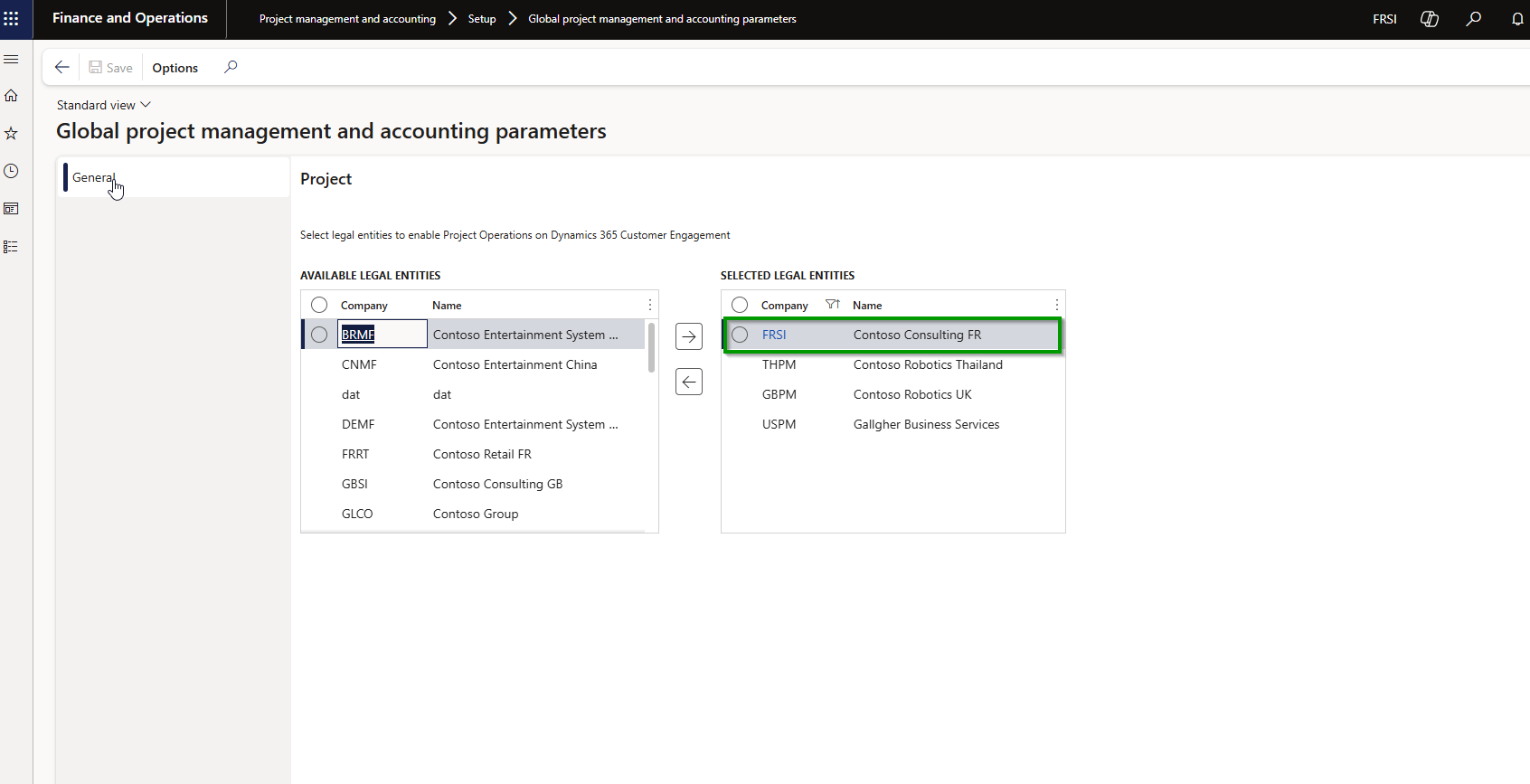
    You will first need to include the legal entity where you are using the PMA module in the global parameters in order to enable the modern architecture of Project Operations.
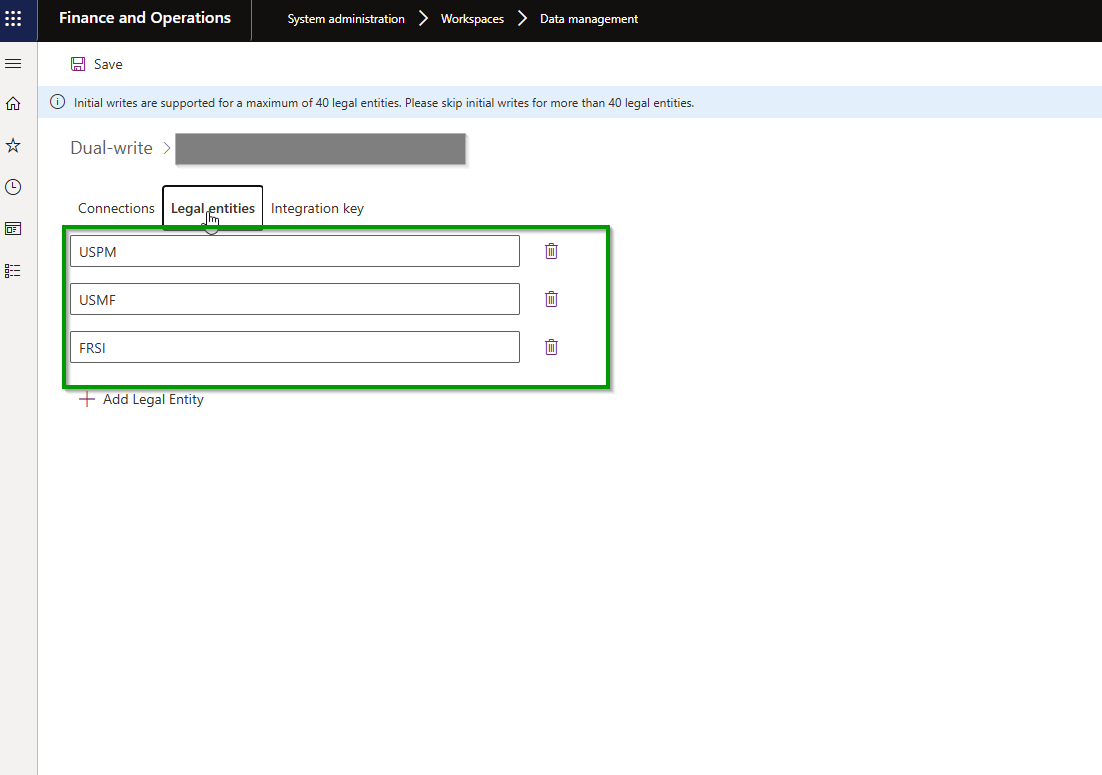
    You can then go through the technical steps of including that legal entity in the dual-write integration keys and likely perform an initial sync to get the foundational entities initial synced between F&O and Dataverse. This is a requirement for the modern architecture.
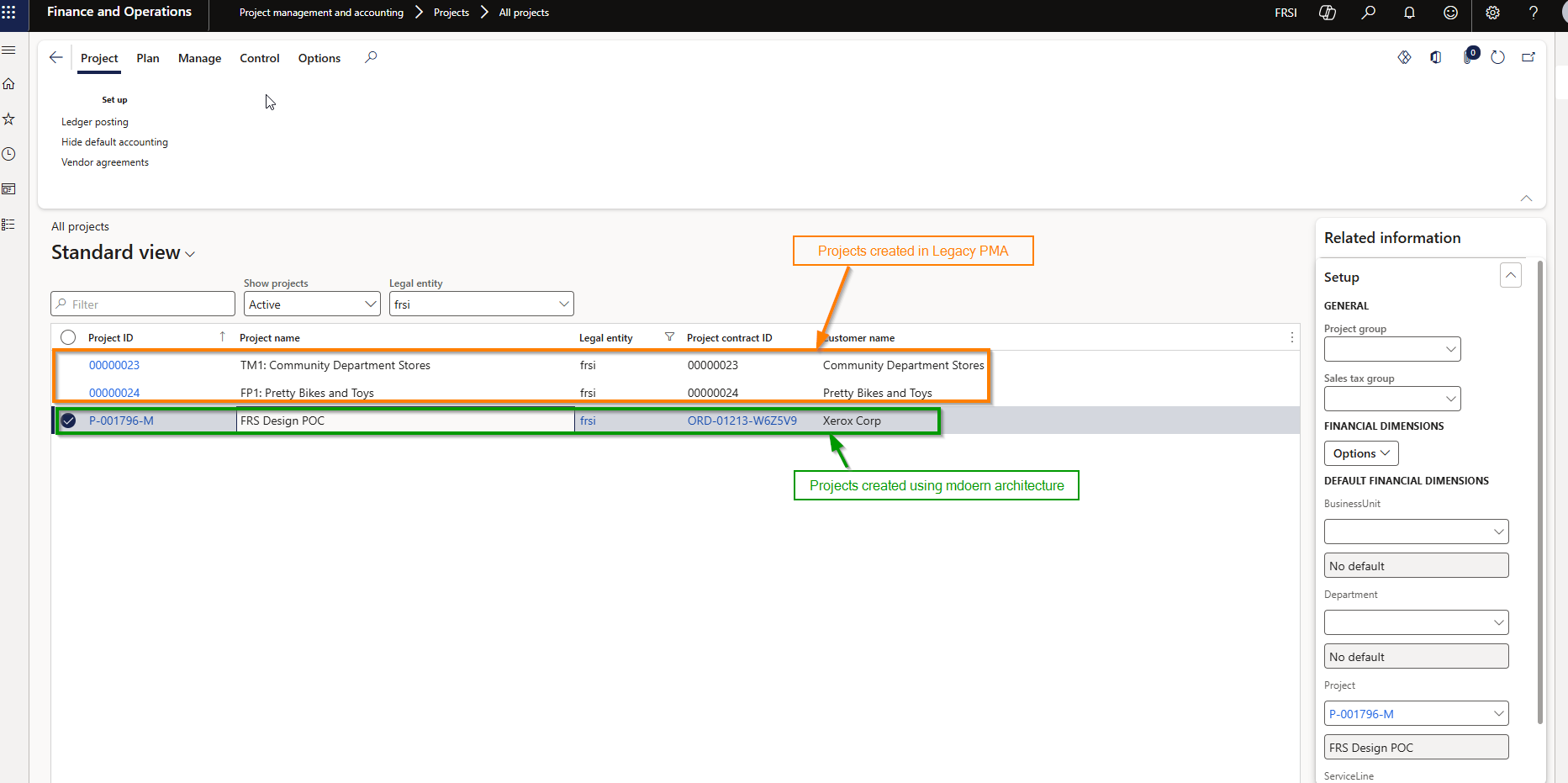
    With those in place, when you go look at your projects that were created with the PMA solution will have limited features and functionality available which provides you pretty much everything you need in order to execute the remainder of those projects and eventually close them out.

    Below are the features that are available for closing out the PMA projects.

    1. Manage Project stage transitions
    2. Manage Ledger postings configurations
    3. Setup/update cost prices and sales prices
    4. Process Hour/Expense/Item/Fee journals to update costs/revenues and general journals on projects if required.
    5. Process project item requirements.
    6. Create or complete purchase orders, requisitions, RFQ, agreements linked with the PMA project.
    7. Create/Update on-account transactions.
    8. Project Expense reports.
    9. Create and post project invoice, credit notes and customer advances.
    10. Revenue Recognition processing.
    11. Intercompany invoicing

    Below are the features that are NOT available for the PMA projects:

    1. Adding advanced project contract details such as billing rules, multiple funding sources, rules and limits are not available. This can be a key consideration if you are using this functionality in the PMA. Before you enable the modern architecture, you need to ensure that all your contract definitions are up to date so that you can continue executing the billing for the contract/project. It is likely that you may find some contracts which will end up being candidates to be migrated to the modern architecture.
    2. As of 10.0.46 release, Project Timesheet Entry is not available. This means you will need to rely on Hours journal entry to account for the hours for resources for the remainder of the project. I can see this being an issue for some customers especially if they are using a lot of intercompany timesheets.
    3. Cannot edit project forecasts or budgets: Should not be a deal breaker and there are ways to make get around this constraint.
    4. Below screenshot shows legacy PMA and Modern architecture projects existing in the same legal entity in F&O.
    The move from the legacy PMA module to the modern architecture is more than a technical upgrade, it’s an opportunity to rethink and elevate your entire “Project to Profit” lifecycle. With AI‑driven planning, agentic automation, unified resource management, and F&O’s trusted financial capabilities, organizations can reduce operational overhead, accelerate execution, and improve profitability.

    With coexistence support now available in version 10.0.46, PMA customers can modernize with minimal disruption, closing existing projects while launching new ones on a future‑ready platform.

    Regards,

    Sandeep

  • Time & Expense Entry: The Task no one loves but is critical for all project/service-based organizations – Now Handled by AI Agents in Dynamics 365

    Time & Expense Entry: The Task no one loves but is critical for all project/service-based organizations – Now Handled by AI Agents in Dynamics 365

    Let’s dive into the new innovative Time Entry and Expense Entry AI Agents, which are now available in a production-ready preview within Dynamics 365 Project Operations and Dynamics 365 Finance & Operations! These are not just another feature; it’s a significant step forward in Agentic business applications that can truly transform how we handle project management.

    If you missed my last post about the AI Agentic T&E Approvals capability, you can read it here. That post mainly focused on simplifying and automating approval tasks for project managers.

    Why First Party Agents for Time & Expense Entry:

    Microsoft has released new AI agents in Dynamics 365 to make time and expense entry easier, a task often disliked in project work. These agents automate the process from capture to submission, cutting down on manual effort and mistakes. The integration with Dynamics 365 and Teams supports secure, efficient workflows. This is part of Microsoft’s effort to integrate AI into daily tasks, allowing employees to concentrate on more valuable work.

    The Benefits are aparent:

    • Reduced administrative overhead: Agents create Time and Expense Entries based on project bookings and receipts, saving time for employees. They review and submit these entries, allowing Finance teams and project leads to spend less time on follow-ups.
    • Accelerated billing cycles and cash flow: Real time and accurate capture of time and expenses ensure reduction is missed and incorrect T&E and faster invoice processing.
    • Improved Employee Experience: Employees interact with AI Agents within the flow of their work, i,e., Microsoft Teams. This reduces friction and improves adoption.

    Who this is for:

    If your organization uses Dynamics 365 Project Operations and/or Dynamics 365 Finance and Operations, you can use these new agents. If you only use Dynamics 365 F&O for expense reporting, you can deploy the Expense Entry agent.

    Let’s see the Agents in Action:

    The Time Entry Agent understands your project assignments and bookings and does automated time entry for you. It can check previous weeks’ timesheets and create current week entries based on that. It also generates smart comments for entries by looking at the project task details like the description and project name. Additionally, it can analyze your Outlook meeting invites to make comments based on meeting event titles.

    You can review time entries created by the agent directly in Microsoft Teams, make changes as necessary and submit for approval. The agent also tracks unsubmitted entries and notifies you for proactive submission.

    The Expense Entry agent on the other hand is even more powerful. All I need to do as an employee is capture my receipts on my phone and send the captured images or PDF files to the mailbox used by the Expense agent. The rest is done by the agent for you. Here is what does for you.

    • Process the receipts from your email or the ones you uploaded via the expense app.
    • Extracts receipt info and create expense lines automatically.
    • Not only that, it goes ahead and creates the expense report for you based on trip or by project (based on config) and sends a live summary of the expense reports in Teams for you to review and submit.
    • Additionally, it can intelligently identify active projects and assign those based on project location matching if you do project-based expense reporting. If you do your reporting by trip, it can create reports based on the location of travel and associate receipts. The agent can read your calendar events to look into details which may have key details such as location, project ID/name and use it identify project IDs that the expenses needs to be associated to.

    As an employee, you go from just sending receipts to the agent to just reviewing your fully prepared expense report within Microsoft Teams for corrections or submissions. Putting things into perspective, I can see saving an average of 20-30 mins per expense report. More than the amount of time it saves for you, it is the tedious manual work you don’t have to do.

    How can you deploy these for your employees today:

    To deploy the production ready(preview) agents today for your workforce, you will need to ensure the underlying features are enabled and the agentic automation infrastructure is setup correctly. This is more of an administrative one-time setup to get the agents up and running.

    For the Time Entry Agent:

    • Ensure you are on version 4.140.0.239 or late for Project Operations.
    • Enable the Feature for Time and Expense Agent in Project Operations.
    • Activate the power automate flows (used by the agent to complete actions on behalf of the employees, such as create time entries, expense reports etc.)
    • Finally, publish the agents in Microsoft Copilot Studio and optionally share in Teams channel/apps for your employees to get the full experience.
    • Follow Microsoft official guidelines here.

    For the Expense Entry Agent:

    • Ensure you are on D365 F&O version 10.0.44 or later
    • Enable the features for “Immersive home and Agent management in F&O.
    • Setup the Agent behavior under the Expense management parameters.
    • Setup a shared mailbox (This is where your employees can send their receipts to or just upload via the expense mobile app).
    • Activate the power automate flows (used by the agent to complete actions on behalf of the employees, such as create time entries, expense reports etc.)
    • Finally, publish the agents in Microsoft Copilot Studio and optionally share in Teams channel/apps for your employees to get the full experience.
    • Follow Microsoft official guidelines here.

    Under the hood

    The agent orchestration is managed by Copilot Studio along with a set of key Power Automate flows for both the agents. For the expense agent, these flows perform actions such as extracting expense details from receipts, identifying project IDs, reviewing calendar events when necessary, generating expense reports, and sending them to employees via Teams cards. The process begins with a Power Automate flow that runs periodically to process emails containing receipts and added to the unattached receipts entity. The agent subsequently parses these receipts to extract information, creates unattached expense lines, links the receipts, identifies project IDs, and assembles the final expense report.

    Config Parameters that control the behavior of the Expense agent for report creation:

    Take the agents for a spin today and encourage your employees to take advantage of these.

    Regards

    Sandeep

  • Bridging Stocked Inventory and Project Delivery in Dynamics 365 Project Operations Integrated ERP Deployment – A True Game Changer!

    Bridging Stocked Inventory and Project Delivery in Dynamics 365 Project Operations Integrated ERP Deployment – A True Game Changer!

    Microsoft has just closed a critical gap in Dynamics 365 Project Operations with the release of Manage Stocked Products for Integrated ERP Deployments. For leaders overseeing material-intensive projects in construction, engineering, field services, this is the missing link that finally aligns inventory control with project delivery in a unified ERP architecture.

    With this feature, organizations can now:

    • Gain real-time visibility into on-hand inventory via Dynamics 365 Finance & Supply Chain Management
    • Track material usage across the full project lifecycle—from estimation to invoicing
    • Automate cost and revenue recognition tied to stocked product consumption
    • Eliminate reliance on Project Management and Accounting module in F&O and start thinking about migrating to the modern architecture of Project Operations

    For project executives and operations leaders, this capability is more than a feature, it’s a strategic lever. It streamlines material tracking, strengthens cost control, and enables real-time inventory visibility, driving smarter decisions and faster execution across complex, resource and material intensive projects.

    I was finally able to get my hands on this preview feature, and I am excited to share some insights. I am not going to discuss the step by step of how to enable the new feature. You need to make sure you are on the latest versions of D365 Project Operations (4.1.142.0 or later) and F&O (10.0.44 or later) and work your way through the necessary dual-write setups.

    Let’s get to the crux of what this new feature offers.

    Viewing Inventory Products in Project Operations:

    Dynamics 365 F&SCM serves as the main source for managing inventory. Both stocked and non-stocked products are created and managed in D365 F&SCM. New products are immediately visible in Dynamics 365 Project Operations for project managers and stakeholders.

    When this new feature is enabled, you will see the new Products menu/site map where you can view all products that came in from D365 F&O SCM automatically. This leverages the “unified products management/integration” between F&O ERP and Microsoft Dataverse.

    Product Cost and Sales Prices:

    D365 F&SCM offers comprehensive pricing engine for products and is the source of truth for the cost and sales price data for products. The standard cost and sales prices specified for the product in D365 F&SCM automatically sync over to Project operations again using the “unified product integration architecture”, where they sync the prices into the cost and sales price lists within D365 Project Operations.

    For now, this feature uses the defaults prices for the products, however I am fully expecting this to mature into leveraging the “On demand D365 SCM pricing engine” at some point in the future.

    Viewing available on-hand for stocked inventory products:

    On the Products page within Project Operations, Project managers/stakeholders can view on-hand inventory products if required. This comes in handy where they get visibility into real time inventory without having to navigate to D365 F&O.

    Include stocked products in project estimates, quotes/contracts:

    Project Managers and stakeholders who are working on project quotations, estimations or project contracts can now include stocked inventory products.

    Buying stocked inventory for projects:

    Project managers or Procurement managers can now include stocked inventory materials on purchase orders they created for a project in the integrated ERP deployment.

    Important Note: Project Operations in the Integrated ERP deployment already supports non-stocked items/procurement category-based purchase orders, however with the introduction of the support for stocked inventory products, there is a difference in when the costs of the stocked materials are posted to the project and general ledger. As soon as the PO is confirmed, the necessary accounting distributions are created using the ledger posting profile for Items for projects. This accounting distribution is used to post the cost to the project and GL as soon as the vendor invoice associated with the PO for the stocked product is posted in F&O. This behavior is different than how it posts in case of a PO that has non-stocked products or procurement categories where the costs are posted to a temporary procurement integration account and synced later from Project Ops Dataverse using the actuals integration journal. Little technical details, but important for consultants!

    Posting vendor invoices for stocked products on projects:

    When vendor invoice for the purchase order for stocked products is recorded and posted, the project costs are posted in D365 F&O into the project sub-ledger. The vendor invoice information automatically syncs over to Dataverse to generate cost and unbilled sales actuals and unbilled sales actual details comes back into F&O using the actuals integration journal.

    Note: As products are received at the warehouse, the product receipt transactions are not recorded in the Project actuals in Dataverse and don’t post to project sub-ledger in F&O. As this feature matures and adds more capability, I am hoping we will see capability where we can consume the cost of stocked products immediately upon product receipt. It is not supported at this in this release at least.

    Viewing on-hand and Consuming stocked inventory into projects:

    For existing inventory in stock, project managers can not only view real time available on-hand information for stocked products but also consume them into projects using the materials usage log of Project Operations.

    Dynamics 365 Project Operations validates the available on-hand inventory in real time here. If a material usage request was submitted for a quantity that is more than the available quantity for the Site and Warehouse, then the system throws error message there by blocking the submission. Similar validation is done upon approvals of material usage logs.

    Note: You can also consume stocked materials using the journal entry option if required.

    Inventory Costing, Project Costing & Adjustments:

    When materials are consumed using the material usage log in project operations, it uses the default cost price available for the product/material that was last synced from F&O.

    However, for stocked products, the consumption of inventory always happens at the weighted average cost of the item regardless of the costing method for the material.

    If the costs of the material transactions that came in the integration actuals journals differs from the weighted average cost of the material, the difference is synchronized back to Dataverse. This value is stored in a distinct data field named “Adjustment value” and it updates the Extended amount accordingly. There is a new batch job as part of this new feature that needs to setup and run which will basically sync these adjustments if any after the “Inventory Closing and adjustments” have been run in D365 F&O.

    That’s it for this post!!

    Best,

    Sandeep
  • Unlock faster time tracking, approvals, reduced revenue leakage, and accelerated billing with the new Time and Expense Agent in D365 Project Operations

    Unlock faster time tracking, approvals, reduced revenue leakage, and accelerated billing with the new Time and Expense Agent in D365 Project Operations

    For project and service driven organizations, accurately capturing and processing time and expenses is a balancing act between operational efficiency and revenue integrity. Manual entry delays, inconsistent submissions, and incomplete data can cause serious ripple effects—ranging from incorrect approvals, billing errors to delayed client invoicing and, ultimately, revenue leakage.

    Enter the new Time & Expense agent in Microsoft Dynamics 365 Project Operations, a game-changer designed to automate and streamline this critical process. Built on Microsoft Copilot Studio and the Power Platform, this intelligent agent not only empowers your employees to submit time and expense entries more quickly and accurately by staying in their flow of work within Microsoft Teams but also automates T&E reviews for project managers giving real-time visibility into project costs. The result? Faster time and expense approvals processing cycles, improved project accounting, and minimized revenue loss.

    The Agent is now in Production Ready Preview! If you’ve updated your solution to version 4.140.0.239 or later, you should already see it in action. While I’m still diving into the details of the Time and Expense Entry experience, I wanted to share a few quick thoughts on the Approvals Experience today. More insights to come soon—stay tuned!

    The new T&E Agent in Project Operations will transform the way your organization thinks about processing T&E entries and approvals. By simply uploading your organization’s T&E policy document, the agent intelligently interprets approval rules—automatically distinguishing which entries are “Ready to Approve” and which ones “Need Review.”

    Furthermore, it can process approvals for compliant entries on its own, significantly reducing the manual effort involved in reviewing each submission. This means project managers and approvers can focus their attention where it’s truly needed, while the agent takes care of the rest.

    The T&E policy document can look something like the below screenshot.

    You can just upload the policy document into D365 Project Operations under the Agent setup parameter area and agent does the rest of the work for you.

    Now that the policy document is in place, let’s see how the approval experience helps accelerate the T&E approvals.

    Let’s now go ahead and create, submit time entry. Bye the way, screenshot below shows the newly released Calendar view of the time entry which is Awesome. I strongly recommend you explore this further!

    Under the hood is an Approvals agent trigger which is a Cloud Flow that runs on a recurrence and gets the input parameters of each time entry lines that were submitted, parses JSON and passes on the dataset to the Copilot agent in Copilot studio.

    The agent configured in Copilot Studio has the detailed instructions, access to the policy document that we uploaded in Project Operations and agent tools (AIPlugin actions) to process the approval actions.

    Let’s now get back to D365 Project Operations and see how the agent flagged and/approved the submitted time entries. You can see the agent was able to flag the time entries as “Needs review” since they violated several of the policies. However, it was able to automatically approve the time I submitted on the “Holiday” project since my policy had an exception for that.

    It looks like our organization’s T&E policies are quite detailed—they even account for factors like resource assignment periods, task start and end dates and require all time entries to align with those parameters. The good news? The new agent gives you full flexibility to configure approval rules based on what best suits your business. Whether your policies are light-touch or highly granular, the agent adapts to reflect your organization’s expectations.

    Notice the agent was able not only able to flag but also was able to tell what policy the time entry line violated. From here, the approvers can take further actions on the time entry such as Approve/Reject or reassign to agent.

    So, what are the key take aways and how does the Approvals Agent benefit your organization?

    1. With the T&E agent, what was once a reactive, error-prone process is now a proactive, intelligent system that supports compliance, accelerates cash flow, and empowers teams to focus on delivering value—not chasing down hours and receipts.
    2. Reduces administrative effort and approval errors for Project Managers while speeding up T&E processing and project throughput. Project Managers gets to focus only on the flagged transactions and not thousands of lines that already meets the policies of the organization.
    3. Accelerates billing and enhances financial accuracy through automated, compliant time approvals. As long as time entries meet policies, they are automatically approved.
    4. As your organization adopts new changes according to changing business conditions, they just need to keep their policy document up to date and upload them in Project Operations and the agent will keep up.

    Next up, we will see how the Time and Expense Entry experience of the agent works and how it can benefit you.

    Stay tuned!

  • Improve your organization’s Cashflow and supercharge employee productivity with Copilot for Finance and Dynamics 365 Finance

    Improve your organization’s Cashflow and supercharge employee productivity with Copilot for Finance and Dynamics 365 Finance

    In the ever-evolving landscape of finance, AI has emerged as a game-changer. Organizations worldwide are harnessing the power of AI to streamline processes, enhance decision-making, and elevate customer experiences. At the forefront of this transformation lies Microsoft Dynamics 365 Finance & Operations, where cutting-edge technology converges with financial and operational insights. In this blog let’s discuss how AI empowers finance teams, drives efficiency, and paves the way for unprecedented efficiency gains and helps achieve customer satisfaction.

    Last week, Microsoft announced Copilot for Finance, a brand-new Copilot offering that is intended to change the way Finance teams of any organization work, by providing them the ultimate productivity gain right in the flow of their work every day. With this offering, Finance team members will have AI assisted data interaction, creation and automation experience in the productivity apps they use every day, i.e. Microsoft Outlook, Excel, Teams and more, without having to go into their ERP systems (Dynamics 365 Finance in this case).

    There are 2 primary experiences of Copilot for Finance in this release. One is in Outlook and the other one is in Excel. In this blog, I wanted to share my experience with the Finance copilot in Outlook.

    Example Scenario: “360 Global Tax Professional Corporation” is one of the Premium customers of “Contoso Consulting USA” and they collaborate frequently with the Accounts receivable and Finance team at Contoso Consulting to query on outstanding invoices which includes things such as requesting copies of invoices, requesting disputing of invoices or even exchanges and notes and activities on existing invoices. Sandeep Prakash, AP Manager at “360 Global Tax Professional Corporation” has questions on some outstanding invoices and also wants to request copies of 2 previous invoices. He also wants to update on 2 other invoices to his counterpart at Contoso Consulting.

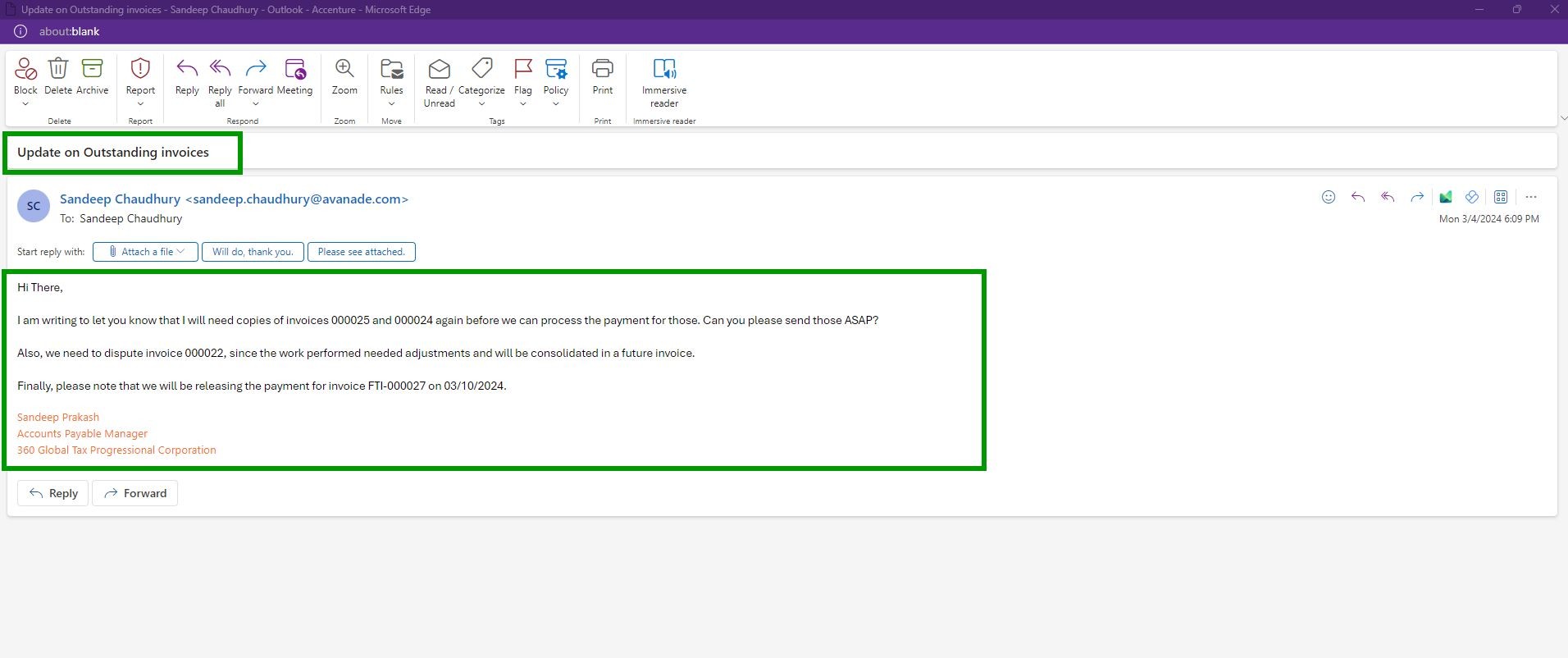
    The Accounts Receivable team at Contoso Consulting receives an email from Sandeep Prakash at “360 Global Tax Professional Corporation“, which looks like below.

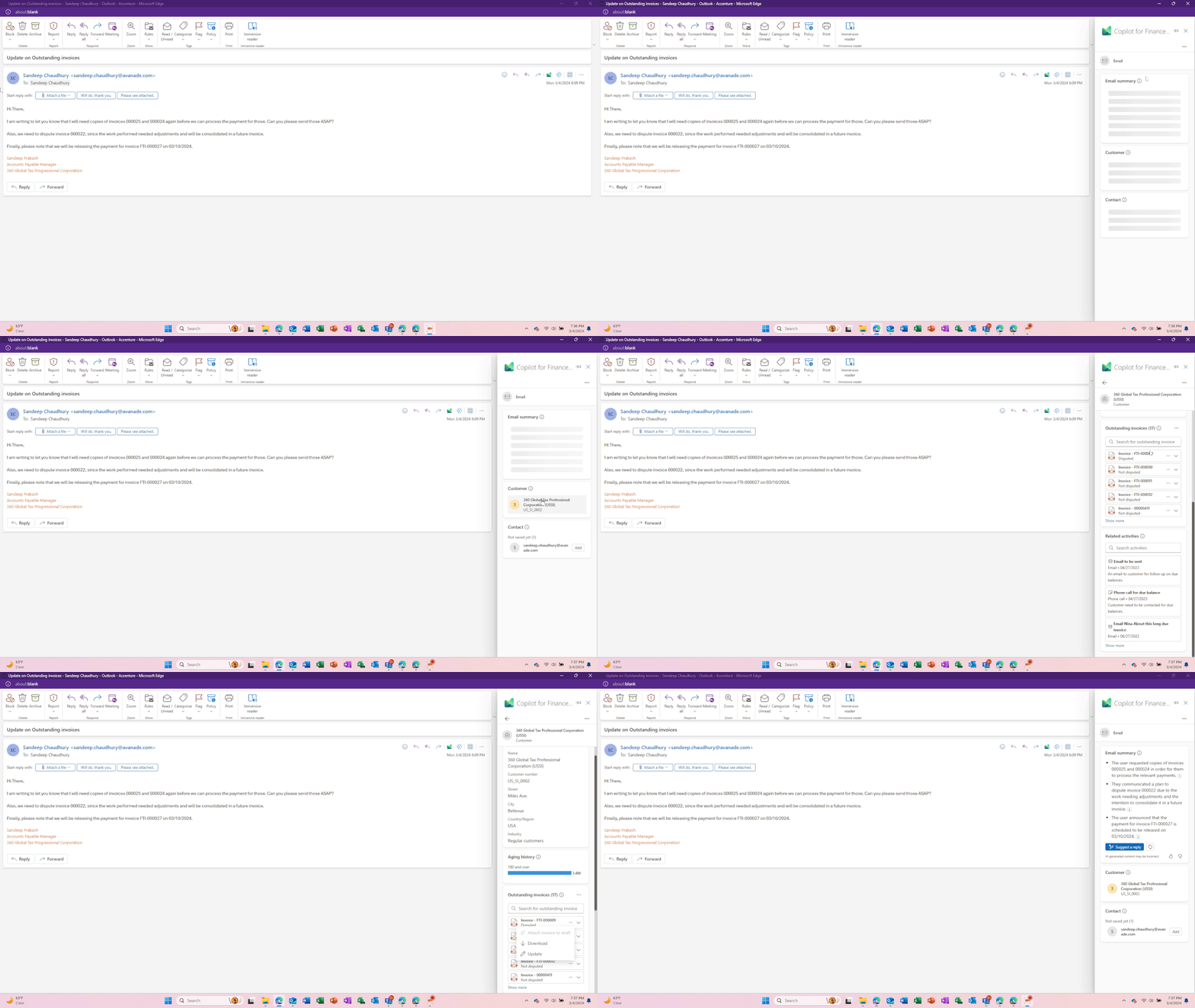
    The AR team at Contoso now has Copilot for Finance working for them. Right within the email they received, they can launch Copilot with one click and Copilot automatically does the following for them.

    1. Knows the who the customer is based on the email received.
    2. Copilot summarizes the email received and highlights the key asks and action items needed, so that AR team does not have to spend time reading the emails.
    3. Copilot also automatically pulls data in real time from Contoso’s ERP/Finance system, which is Dynamics365 Finance and shows outstanding invoices, invoice attachments/copies and also pulls the collection related notes and activities related for the customer.
    4. Copilot also detects that the Contact is not yet saved in the Dynamics 365 Finance and prompts to Add them to ERP directly from Outlook.

    Image below shows the above.

    Without Copilot, the AR would have spent anywhere between 20 to 30 minutes doing all the 4 steps that Copilot did for them with just click of a button within Outlook and allowed them to stay in the flow of their work. That is some significant productivity gain for the team.

    Next, let’s see how Copilot takes this automation further. In this scenario, the AR team at Contoso need to do the following.

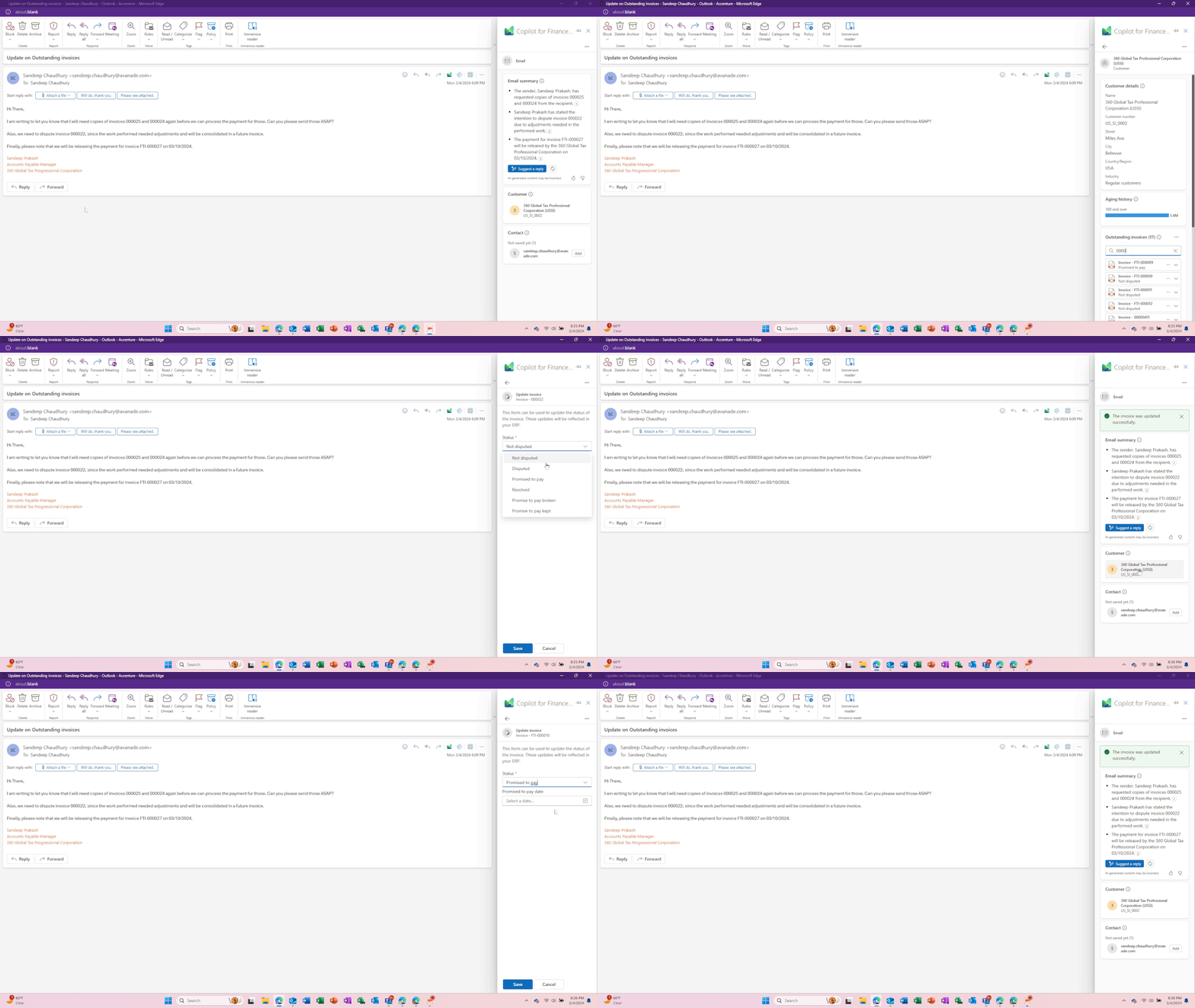
    • Dispute the invoice# 000022.
    • Update the status of invoice FTI-000027 indicating that the customer will pay it on 3/10/2024.
    • Draft an email back to the customer to provide them an update.
    • Finally, they will also need to send copies of invoices 000025 and 000024 that the customer has requested.

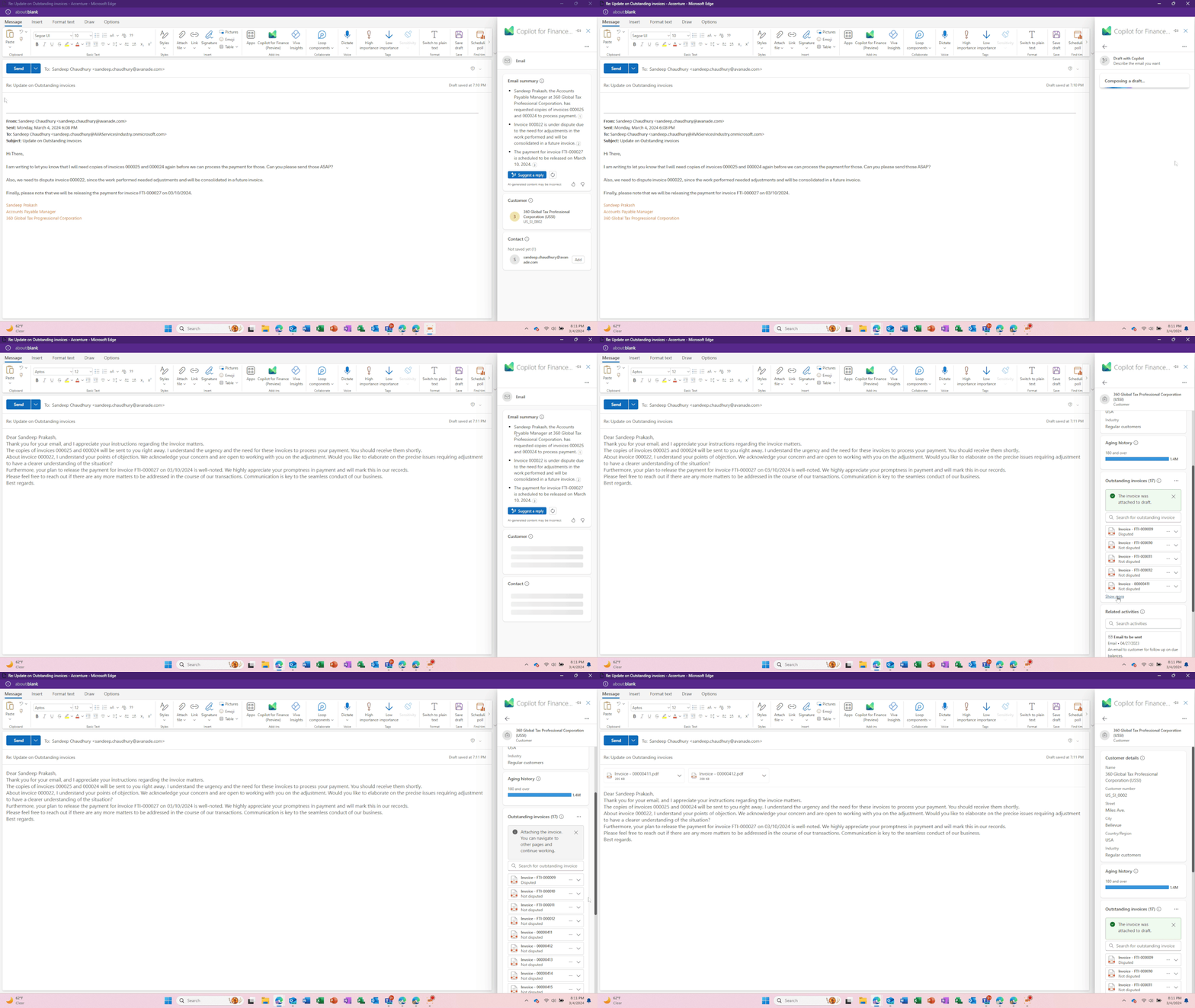
    With the help of Generative AI capabilities, Copilot detects the context of the conversation and suggests a fully composed draft email that the AR team can just review and send. The AR team just clicks Suggest a reply and asks to draft a response to the customer. They also attach the 2 invoices the customer requested within the Copilot experience without having to go into the ERP and when done, they send the email out.

    Images below shows the steps above.

    Without Copilot, the AR team would have spent at least another 20 to 30 minutes to do all the actions listed above in breaking their flow of work by moving out of Outlook, login to D365 Finance ERP, perform all the actions manually and come back and draft the email manually.

    What we just witnessed is Copilot (AI) not just saving time for your AR/Finance team members, but also making them dramatically efficient in their day at work, so that they can contribute to other import tasks for the organization. Copilot not only helps improve the experience of the users of Dynamics 365 Finance, but also helps improve end customer satisfaction, since your finance team is now able to respond time to queries from customers faster with better accuracy with the help of Copilot.

    I can’t wait to explore more on this and also try the Copilot for Finance in Microsoft Excel!!

    Best,

    Sandeep Chaudhury

  • Multiple revenue recognition options/rules under one project in Dynamics 365 Project Operations Non-stocked/resource deployment

    Multiple revenue recognition options/rules under one project in Dynamics 365 Project Operations Non-stocked/resource deployment

    One of the common asks I hear from customers is the need to handle revenue recognition differently for different phases of a project. An example of this is “Contoso Electronics is working on a NextGen EV Electronics Design and Prototype build project for one of its customers. This is a fixed price contract/project that has 3 distinct phases.

    1. Design phase that runs for 3 months. This phase is billed in 2 milestones and revenue needs to be recognized upon Design completion.
    2. Prototype build phase that runs for 9 months. This phase is billed in multiple milestones and revenue needs to be recognized on a monthly basis based on % of completion.
    3. Post prototype support for enhancements work for 1 year. This is a fixed fee billed upfront and revenue needs to be recognized monthly on a straight-line basis.

    There is now a new feature Microsoft released in Dynamics 365 Project Operations Resource/Non-stocked deployment which allows you to accomplish this easily. Before this feature, we were needed to split these phases into 3 different projects, but that is no longer needed.

    The new feature is called “Enable contract line-based revenue recognition with Project Operations for non-stocked/ resource-based scenarios” and this was released in preview last week.

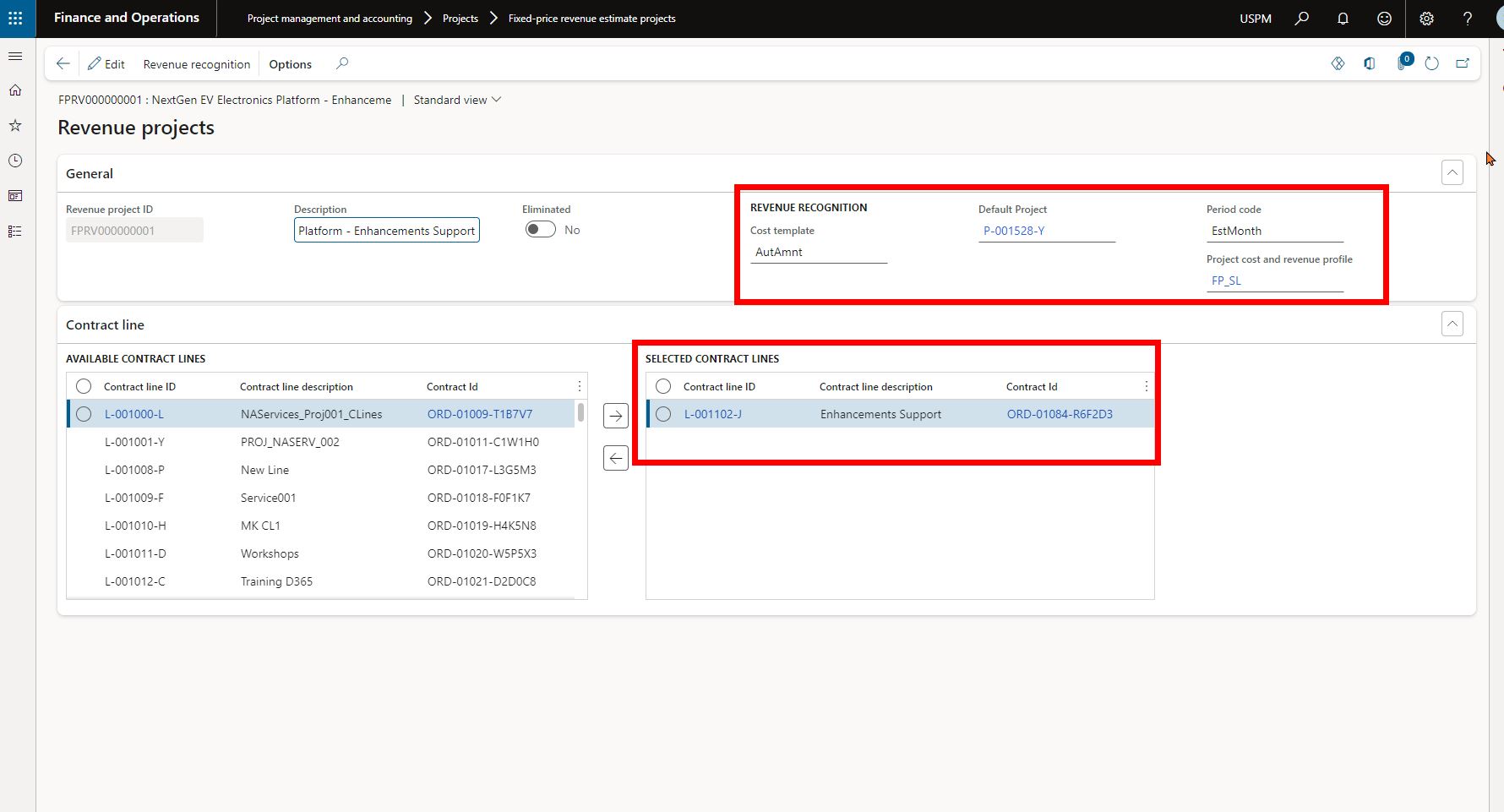
    When you enable this new feature, Project Operations will basically create a separate revenue estimate project for each contract line under the project contract. This allows you to setup one Project Contract that has multiple contract lines, where each contract line represents the work that will be done in each phase of the project. You can then associate separate cost and revenue profiles to each of the revenue estimate projects the system creates and handle the revenue recognition differently for each phase.

    So, for the example scenario I provided above, I have setup a Project Contract that looks like below. Each of the contract lines/project phase have their own invoice schedule and associated contract amounts.

    Screenshot below shows that system has automatically created 3 separate revenue estimate projects, one for each contract line. So basically, we now have a revenue estimate project setup automatically with their own contract amounts for each phase of the project, but the phases belong to one main project.

    Also notice that each of these revenue estimate projects is associated with a different Project cost and revenue profile ID, which allows you to process revenue recognition using different rules for each phase of the project. You will need to select the default parent project for each of these revenue estimate projects.

    The Design phase of the project has revenue estimate project that is associated with the corresponding contract line and is setup with a Completed Contract revenue recognition principle.

    The Prototype build phase of the project has revenue estimate project that is associated with the corresponding contract line and is setup with a Completed % based revenue recognition principle.

    The Enhancement Support phase of the project has revenue estimate project that is associated with the corresponding contract line and is setup with a Stright line revenue recognition principle.

    For the contract line that needs to follow straight line revenue recognition principle, you will additionally need to setup the start and end dates of the revenue recognition under the contract line in the project contract default accounting setup. See screenshot below.

    That’s it. From here on, when you run the job for revenue recognition, system will automatically calculate revenue recognition amounts based on the associated contract amounts for the contract lines and the cost and revenue profile setup.

  • Does your organization have the right business technology to thrive in the subscription economy? See how Dynamics 365 Finance can help.

    Does your organization have the right business technology to thrive in the subscription economy? See how Dynamics 365 Finance can help.

    In the mobile first cloud first era, B2B and B2C businesses of all sizes are continuously introducing innovative subscription based products and service offerings and are finding new ways to generate recurring revenue to stay relevant in the business. The end goal is get customers subscribed to their services, keep innovating at scale to retain customers and create more predictable revenue streams for their business.

    The subscription model of generating revenue is great for organizations for predictable revenue and cash flow, but it also introduces new challenges for them to keep up with the complex billing and revenue recognition requirements. Organizations are challenged to create unique pricing models and easy & affordable bundling of their subscription offerings for faster customer adoption. This certainly requires them to have sophisticated business technology to manage the complex pricing(flat, tiered, flat tiered etc.), billing, revenue recognition and renewal needs. And of course, they have to stay complaint with the ever evolving regulation requirements around revenue allocations down to item level(specifically comply with ASC 606 and IFRS 15) and also manage revenue expense deferrals to align with US GAAP.
    Here is an example. Company A sells their cloud based software apps and hardware in variety of bundled subscriptions. The pricing model of these bundled offerings can be complex with tiered pricing requirements, based on what the customer subscribes to. For the customer, it is just a convenient subscription for which they pay a fixed fee either upfront annually, or pay them quarterly or monthly and they continue to take advantage of all the innovation Company A does in it’s software and hardware and stay up to date. However, Company A as an organization internally has to have the right business technology/application in order to manage the complex tiered pricing for the bundled contracts and be able to to bill accurately. They also have to allocate revenues to multiple revenue streams and manage the financial obligations and performances.

    The Good news: Dynamics 365 Finance now has the Subscription billing and revenue management capabilities built in the base offerings as part of the Dynamics 365 Finance SKU/license. You no longer need to look for ISVs solutions or external 3rd party apps to manage your subscription business. This new module and the features under it are designed specifically to tackle the billing and revenue management complexities of any subscription business and helps you shorten the quote to cash cycle. It also comes prebuilt with analytics and insights that can help your business leaders to make informed decisions.

    Subscription Management Workspace

    Important Note: Microsoft introduced a standalone Revenue Recognition module back in 2020. The new Subscription management module is much more comprehensive, more capable and it does override the capabilities of the earlier Revenue recognition module. So you will first need to turn OFF the Revenue recognition module in the application before you can enable the new subscription management capabilities.

    The 3 main features of the new Subscription management module are as follows.

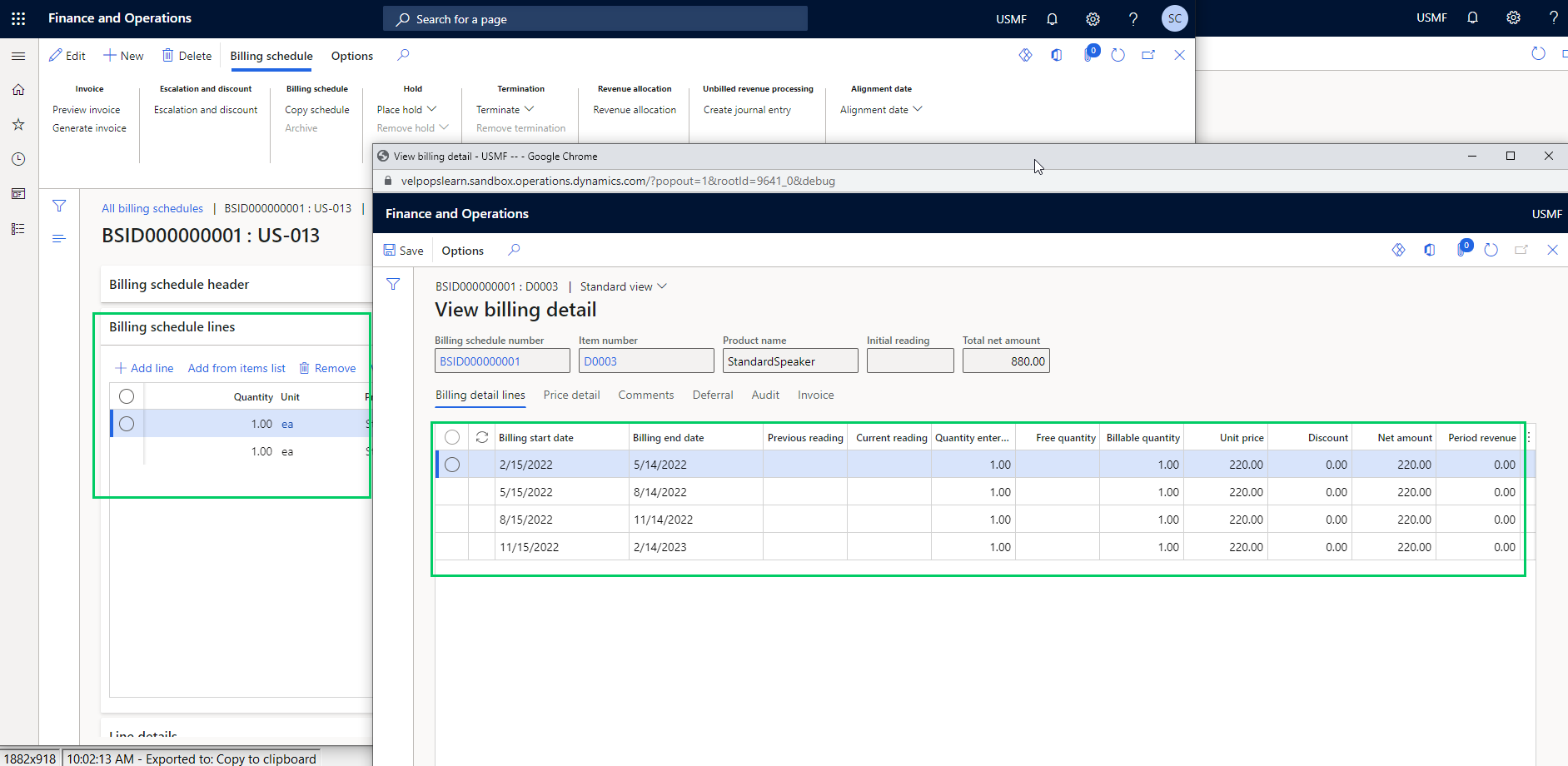
    Recurring Contract Billing: This is the heart of the module. This is where you define the structure of the contract and establish key billing parameters such as the customer account, terms, the line items, dates, terms, pricing, item billing type, billing frequency, schedule, requirements for deferrals, renewals , terminations and more. This part of the module lets you create billing schedules for contracts with customers and automate complex pricing and billing processes. It also let’s you produce consolidated invoices for customers with multiple items under their contracts.

    After you have setup the billing schedules, you can view the automatically created billing schedule and associated details at any time. You can setup advanced pricing options, manage escalations and discounts and deferral requirements, putting contract lines on hold and terminations.

    You can preview invoices by individual lines, or consolidated by item or period prior to creating them and you can also chose what type of transaction to use to create the invoice(Such as Sales order Vs a free text invoice) and you can also chose whether you want to create the invoice lines for additional review or directly post them.

    Revenue Allocation: This part of the module has the functionalities that allows your finance team automate pricing and revenue allocations across multiple items. This also helps organizations that have specifically have to comply with ASC 606 and IFRS 15 standards. This functionality also lets you setup multi element revenue arrangement on contracts and manage those on the billing schedules. We will discuss this topic is greater details in future posts.

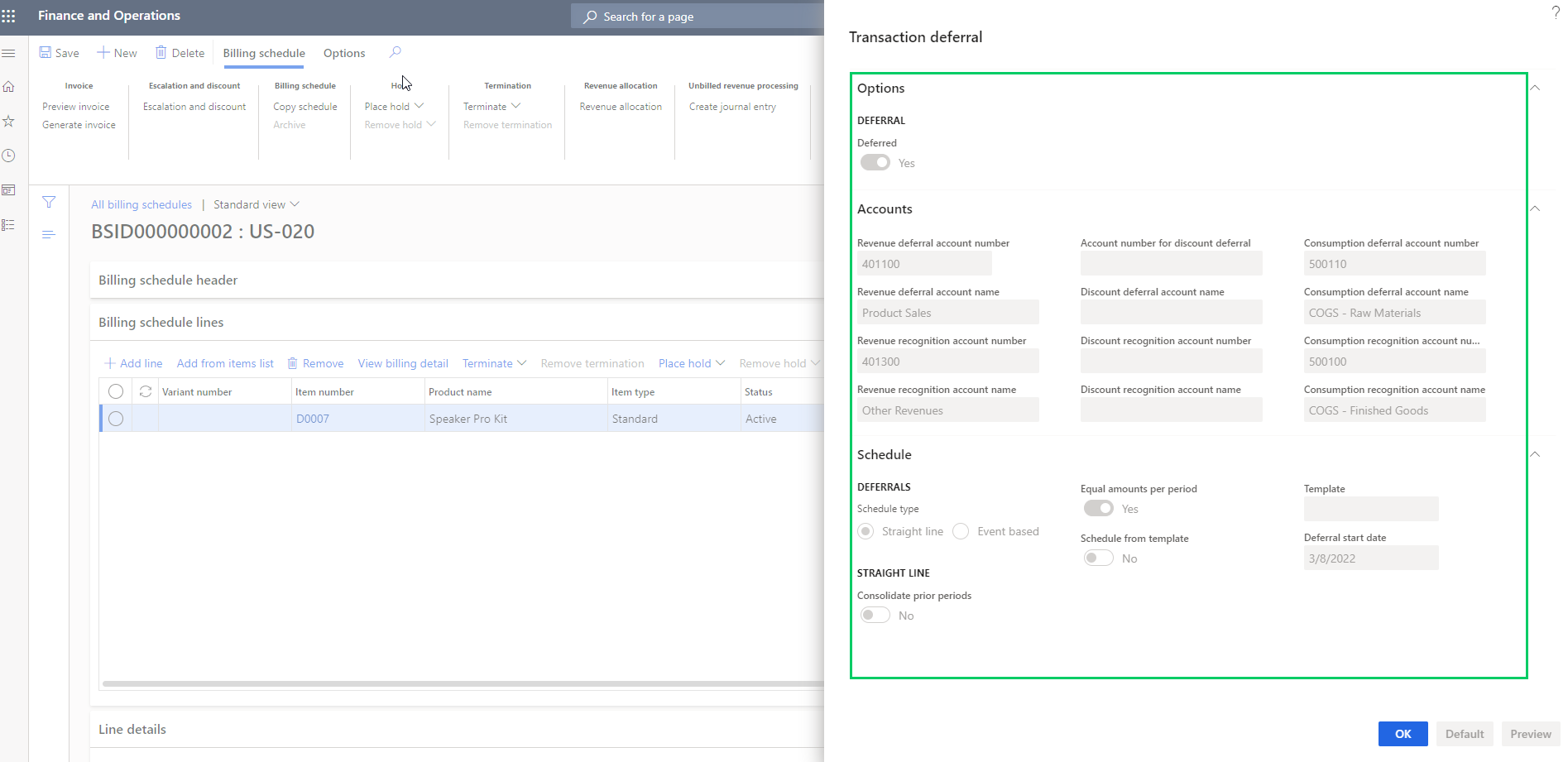
    Revenue and Expense deferrals: This functionality allows organizations to manage revenue and expense deferrals to stay compliant with US GAAP standards. In the ever evolving regulations in the subscription economy, this functionality will help your finance teams to use less manual spreadsheets and allows them to manage those directly in the system. You can setup the system to automate the deferrals on variety of source transactions such as Sales orders, purchase orders, general journals, FTI and manual invoice journals. You can chose deferral schedule types such as “Straight line or Event based” on your contract/billing schedule lines and also setup advanced deferral parameters on how you want to manage deferrals of discounts associated with revenues and expenses.

    When you generate the invoices for the billing schedules, the system will automatically create your deferral schedules . You can view the details of the invoice associated with the deferral schedule.

    You can manage deferrals from there on easily.

    That’s it for this post. I just wanted to highlight some of the key capabilities of the new Subscription Billing module in Dynamics 365 Finance and how it can help manage your complex subscription billing and revenue requirements. We will get into details of each of these functionalities, the setups and processes involved in upcoming posts.

    Till then, keep reading.

  • Workflow work item approvals in D365 F&O using Microsoft Power Automate/Flow

    Workflow work item approvals in D365 F&O using Microsoft Power Automate/Flow

    Possibilities of business processes automation and extension is limitless when you use Microsoft power platform. Use PowerApps to extend user interfaces and functionality of your CRM or ERP apps, use power automate to automate business process actions or use AI builder and RPA to reduce manual labor intensive work for your employees. Dynamics 365 and Power platform together provides the most comprehensive business applications and automation, analytics platform in the market today.

    One simple example use case is exposing workflow work items that originate in Dynamics 365 F&O for various business documents such as purchase orders, vendor invoices, budgets, timesheets and expense reports to Microsoft Power automate and then build the required automation flow to take advantage of the Microsoft flow Approvals solution. This gives your employees the flexibility of taking action on critical business documents quicker within Microsoft Teams, or within the Teams app when they are on the go.

    I have a very simple flow in place, which is subscribed to the expense report approval business event in Dynamics 365 F&O. Every time an expense report is submitted in F&O and it is ready for the reviewer to take action, the flow will extract the required information from the expense report approval work item using the JSON schema of the business event and then sends an approval action within Microsoft Teams to the approver of the expense report. After the approver takes action on the work item within Teams or on their phone, the work item is completed in real time back in Dynamics 365 F&O.

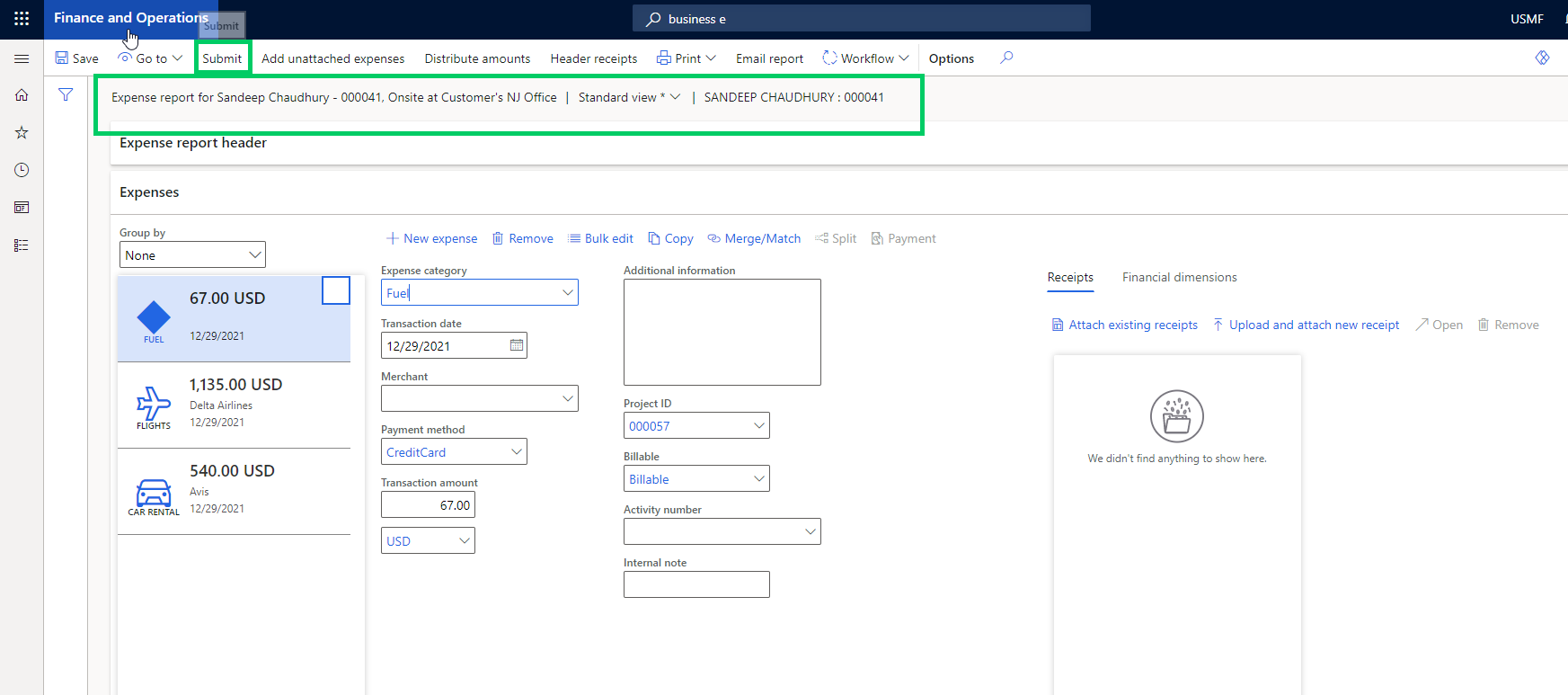
    With this flow actively running, let’s submit an expense report in D365 F&O. The expense report number in this case is 000041.

    As soon as the report is processed in the workflow engine of F&O and it gets assigned to the reviewer/approver, the business event is going to notify our Flow. The flow then runs and sends an approval notice to the approval using Flow approvals action.

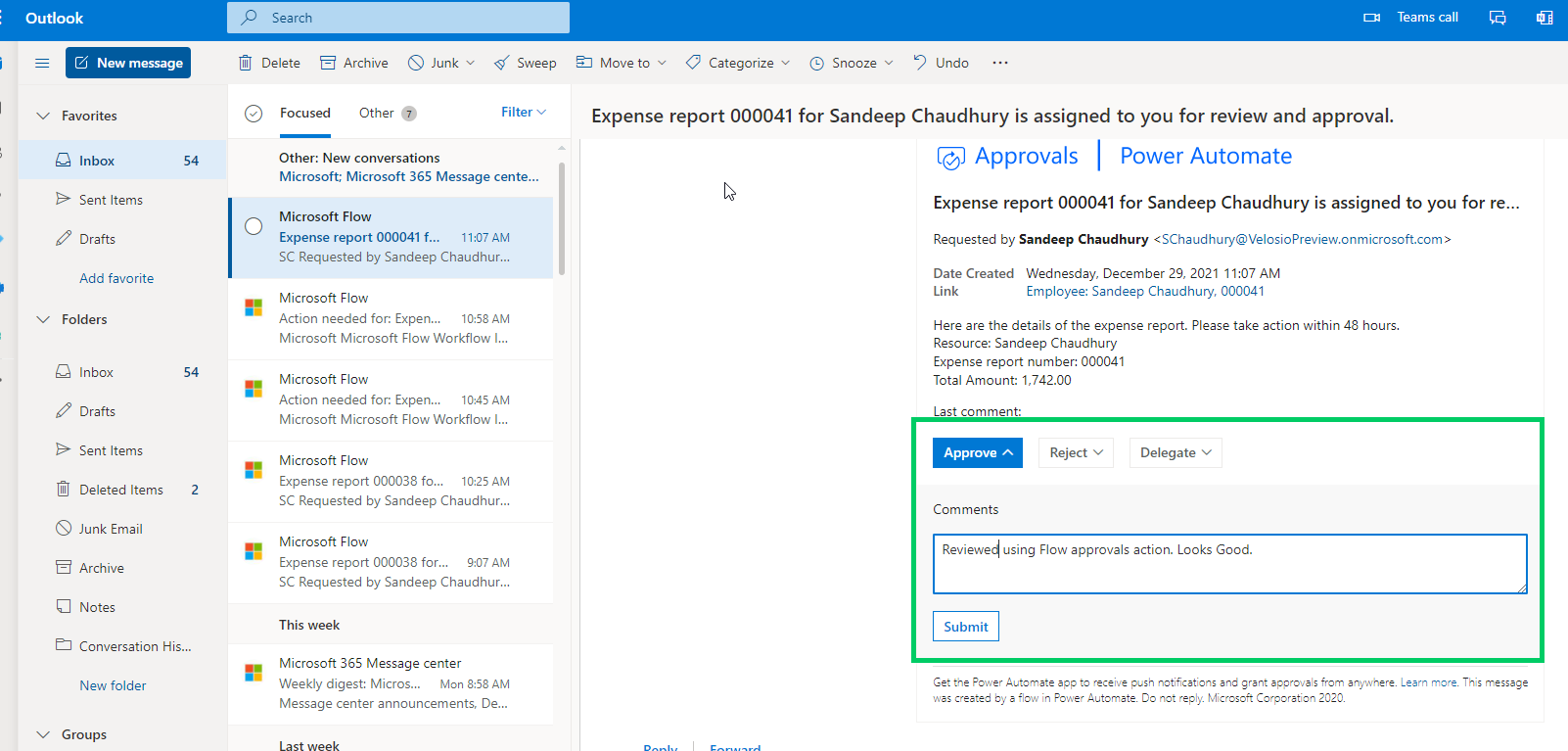
    The approver then gets notified via email as well as in Microsoft Teams regarding the expense report submitted for their review.

    Nevertheless, if the approver is using either Power automate or Teams mobile app, they get notified within those apps as well.

    The approver can then take the required action (Approve, Reject, Delegate etc.). Let’s assume they approve the expense report in this case.

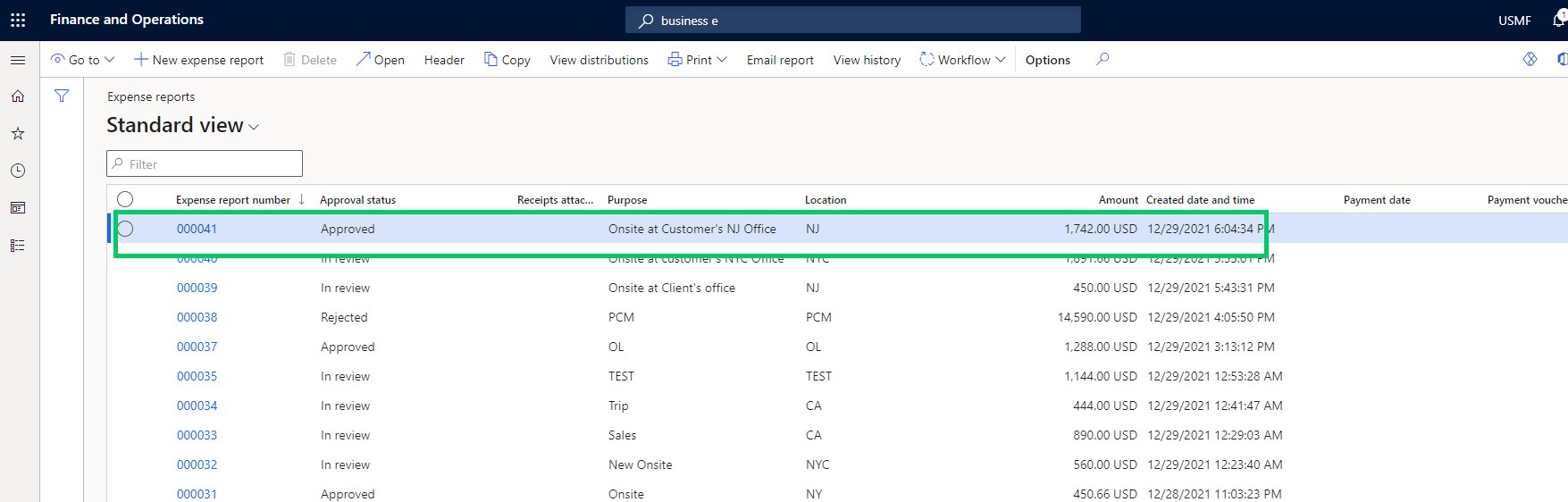
    Now if we go back to Dynamics 365 F&O and check the expense report status, it should be Approved. We can also view the history to validate that this was approved using Microsoft flow.

    That was just a very simple demonstration of what is possible . You can apply this to your situation and make more complex business process automation and extensions.

    Till next time!!!

  • Dynamics 365 Finance & SCM Tip: Setup an alternate email ID for workflow notifications for your users

    Dynamics 365 Finance & SCM Tip: Setup an alternate email ID for workflow notifications for your users

    There is a new feature under the Feature management area that you can enable to setup an email ID for your users dedicated for workflow related notifications in D365 Finance and Supply Chain.

    When you enable this new feature, you will see a new field named “Alternate email” on the User Options page under the Workflow tab. When you specify an email ID here for the user, all their workflow related notifications will be sent to this email ID.

    If you leave this field blank, the workflow emails will be sent to the email ID setup under the sender email field.

    How will this feature help you?: Let’s say you have setup D365 Finance to send Payment advices to vendors for ACH payments and users in the Accounts Payable team would like these payment advices to be sent from the Accounts Payable email alias, instead of their specific email ID. These users in the AP team also receive workflow notifications for various workflow that they are a part of. For a situation like this, you can set the “Sender email” to be the Accounts Payable email alias and setup their user email ID under the Alternate email data field.

  • Dynamics 365 Finance Tip: Did you know you can now apply cash advances to individual expense report lines?

    Dynamics 365 Finance Tip: Did you know you can now apply cash advances to individual expense report lines?

    Here is a quick tip on a new feature in the Expense Management module of Dynamics 365 Finance introduced in version 10.0.17.

    If you give cash advances to your employees for expenses they might incur(Office or travel related expenses), they now have better control over applying specific cash advances(s) against each line of their expense reports.

    Before the 10.0.17 release, cash advance application/reconciliation was automatically controlled by the system and the balance was tracked behind the scenes. This worked, but was lacking control and traceability/troubleshooting as such.

    With this new feature, employees can submit cash advance requests using the Cash advance feature. Once the request is approved and paid, they become available for application/reconciliation against specific expense report lines.

    When you go to enter your expense report, you will see the option to select one or more cash advances against the expense repot line. The system will automatically bring in unapplied cash advances on the screen.

    Till the next one..