Hi Friends,
In one of my earlier posts, i gave a resolution for the error which users face normally when creating time sheets in AX 2009 PSA module.
Just wanted to update the resolution for AX 2012 as the navigations are all changed in AX 2012.
As we all might be knowing that in AX 2012 users now will have to enter the timesheets in the Employee services portal(Enterprise portal).
Launch the EP in AX 2012 and navigate to New timesheets( as shown in screen below ) .
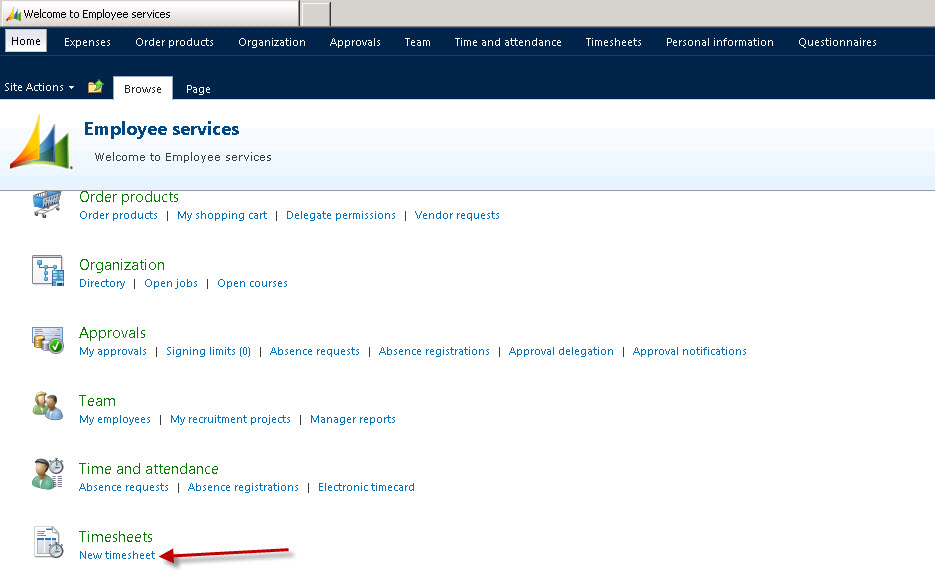
Click on the New Timesheet link. Now if you face an error as shown below then follow the steps mentioned below to fix it.

Steps to Fix the above error:
- Navigate to Human Resources > Common > Workers > Workers.
- Select the employee/Worker which has this issue.
- Click Project Management tab.
- Click Setup > Project setup.
- Set a value for Period code ( For eg :EmplMonth). Refer to screenshot below.

- Save and close the form.
- Now to ensure that the timesheet periods are created for this period code, navigate to Project management and accounting > Setup > Timesheets > Timesheet period types.
- Select the EmplMonth period code.
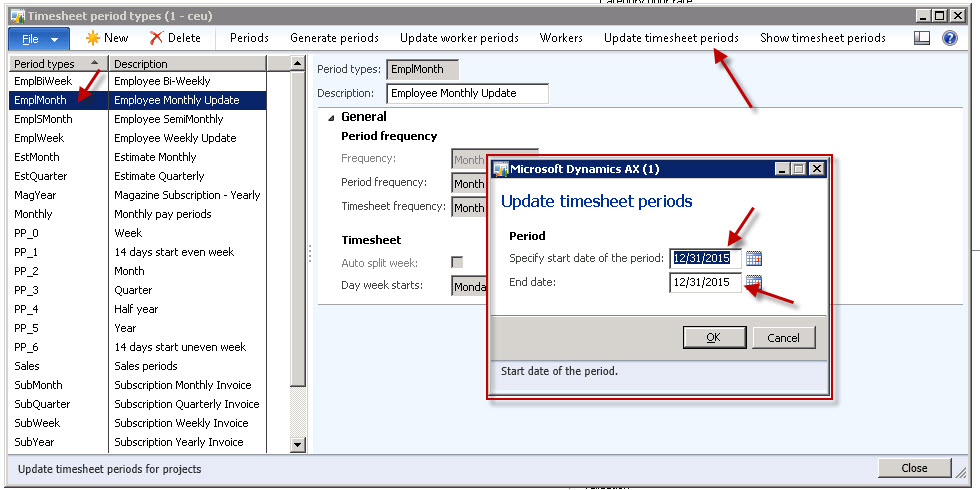


Do let me know if you need further assistance on anything related to this post. ThanksKeep DAXING :)


 Microsoft Dynamics 365 Blog
Leave a reply to world famous quotes (@world_quote) Cancel reply