Author: Sandeep Chaudhury

  • Now Process your U.S.Payroll In-house with Microsoft Dynamics AX 2012 R2

    Now Process your U.S.Payroll In-house with Microsoft Dynamics AX 2012 R2

    Microsoft Dynamics AX is POWERFUL yet again !

    With the strong enhancements to the global talent management functionality and introduction of end to end U.S. Payroll processing functionality within AX 2012, in the R2 release, Microsoft Dynamics AX now gets even more powerful.

    Below are few of high level capabilities of the U.S. Payroll functionality in AX 2012 R2 release. Read the MS Product team’s blog Here for more details about this.

    • Seamless integration of the U.S. Payroll functionality with the Human resources management allows one time setup of all payroll related data and parameters such as “Deductions”, “Benefits”, “Compensation” etc.
    • Seamless integration with Financials management module facilitates printing of pay checks or direct deposits into employee’s savings/checking accounts.
    • Employees can view their Pay statements on the Employee Self-services portal.
    • Easy tracking of the regular pays and the exceptional based earnings such as Paid time off etc.
    • And More…..

    Thanks

    Sandeep

  • Taking advantage of the On hold funding sources in Project Contracts in Microsoft Dynamics AX 2012

    Taking advantage of the On hold funding sources in Project Contracts in Microsoft Dynamics AX 2012

    Hi,

    Hope everyone is doing well and having great times in this festive season.

    In today’s post I will discuss a very small and useful functionality which is introduced in the project management and accounting module of AX 2012. This is the new “On hold funding source type” for project contracts.                                                                       

    When you use the funding limits on the project contracts, the “On hold” funding source can prove to be very useful in allocating any transaction amounts which exceeds the specified funding limits for the other funding sources present in the project contract. The on hold funding source is referred to one of the internal organizations of AX 2012, which are the business units setup in the company.

    Let me now elaborate this with an example.

    Let us say there is a project contract with one customer as funding source and one on hold funding source. Also there is a funding limit of $2000 for the customer which is the funding source for the project contract. Take a look at the screen below for such a project contract.

    image

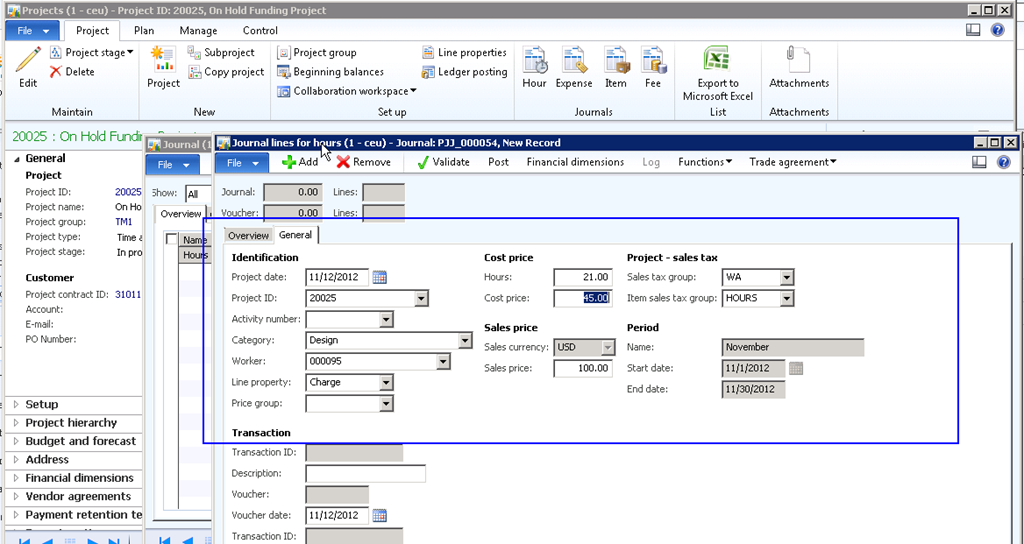
    Now, let us post few transactions on the project belonging to this project contract, such that the amount exceeds $ 2000 and see how the on hold funding works. The below screenshot shows an hour journal posted on this project such that the total sales amount exceeds $2000, the funding limit for the customer.

    image

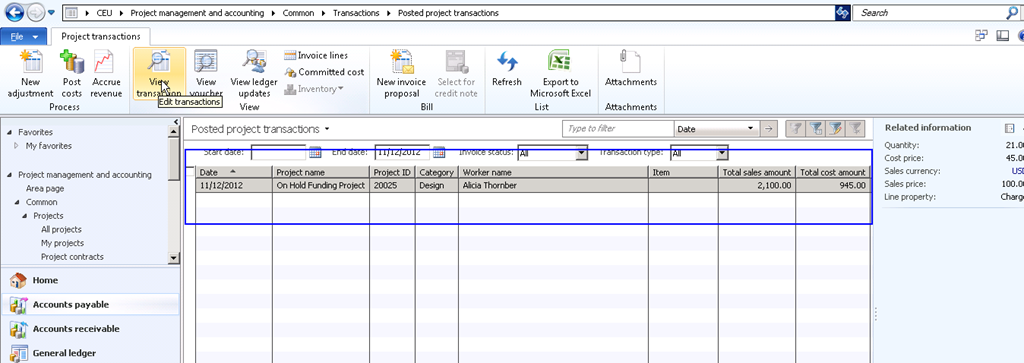
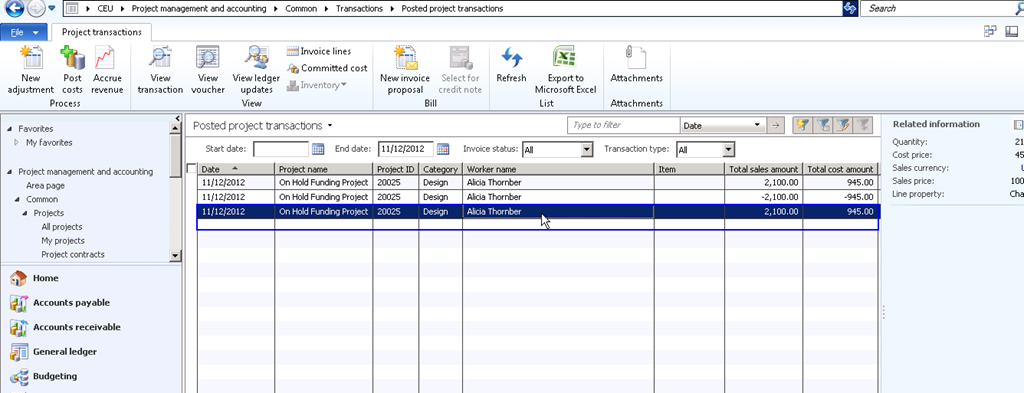
    If we go to the project posted transactions and take a look at the funding allocation, this will show how the exceeded amount of $100 is allocated to the On hold internal funding source and the allowable $2000 is allocated to the customer funding source.

    image

    image

    Now that the exceeded amounts are allocated to the On hold funding source, you can use adjustment function later to allocate these amounts back to the funding source when funding limit changes after agreement with the customer. The advantage of having the On hold funding source is that, it will allow posting of transactions even if the sales amount exceed the specified funding limits for the funding customers in the project contract.

    Let us now change the funding limit to $3000 as the customer has agreed upon the same and then run adjustment for the transaction to see how the amount which was allocated to the On hold funding source, gets allocated back to the customer.

    Funding limit change is shown in screen below.

    image

    After you change the funding limit for the customer in the project contract, adjust the transaction to see the impact how the transaction gets allocated back to the funding source.

    Select the adjusted transaction and verify the transaction to see that the amount $2100 is now allocated to the funding source which is Forest wholesale.

    image

    image

    Powerfully Simple. Microsoft Dynamics AX 2012.

    image

    Feel free to ask any queries about this.

    Thanks

    Sandeep
  • Managing Travel Requisitions in Microsoft Dynamics AX 2012

    A travel request is a business process where the employee/traveler takes a pre-trip approval from their managers or superiors. A travel request/requisition may contain information such as the date, destination, purpose of the travel and also details about  transportation, accommodation, cash advances and overall estimated cost of the travel.

    The travel requisition functionality in Microsoft dynamics AX 2012 is a system aided way of managing the submission and approval of business travel trips. This is a source document which contains the details of the expenses which will be incurred on a travel.

    In today’s post I will explain the travel requisition process functionality of AX 2012. Before we look at the steps for processing a travel requisition in Microsoft Dynamics AX 2012, let us  know how it can help organizations to control expenditures, specifically when they work on fixed price projects and the travel expenses must be under the budget of the project.

    • It can be made mandatory for employees to get approval of a travel request prior to the travel.
    • Several travel request policies can be setup at the Project, customer, and resource levels in terms of expense amounts on different expense categories.
    • Travel requisitions can apply in cases whether the employees are charging the expenses to a corporate credit card, using cash from a cash advance or even out-of-pocket expenses which employees may incur and gets reimbursed for those later.

    Travel requisition business process:

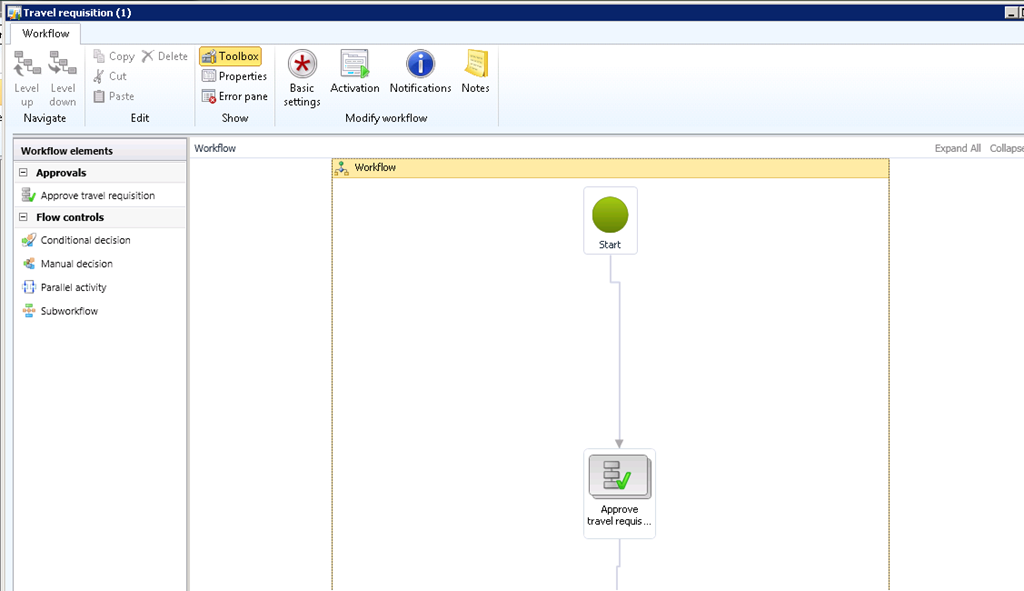
    The first step involved in the travel requisitions management process in AX 2012 is to configure a workflow as desired by the business. Configure this workflow under the Travel and expenses module.

    image

    The next step is to set up all required travel request policies as per the business needs. Do the required policies setup under the Travel and expenses module.

    image

    If the business needs that pre trip approval is mandatory before employees submit their expenses, optionally enable the required parameter in the travel and expense parameters.

    image

    Once the prerequisites are all configured, let us now have an employee submit a travel request.

    Navigate to Employee self-service portal > Expenses > Travel Requisitions.

    Create new travel request and key in all the required details as shown in screen below.

    image

    In this post, the focus is only to highlight the prerequisites and various capabilities of the travel requisition functionality in Microsoft dynamics AX 2012.

    You can proceed further in the process to complete the following and see the real-time impacts and results.

    1. See the travel request policies and workflow in action when employee submits the travel requisition.
    2. Submit the travel requisition.
    3. Travel request gets reviewed and approved by Managers.
    4. Employee has come back from the travel trip and prepares his expense report for submission.
    5.   See the travel request mandatory in action during expense submission.
      Feel free to ask any related questions on this and I will be glad to answer.
      Thanks
      Sandeep
  • Microsoft Dynamics AX 2012 R2 is available now

    Microsoft Dynamics AX 2012 R2 is available now

    Hello Everyone,

    Microsoft Dynamics AX 2012 R2 has been launched now.

    More to come ! New exciting capabilities within Microsoft Dynamics AX 2012 in R2 release. Stay tuned.

    Here are a few highlights of the capabilities in R2 release.

    1. Manage you global operations through a single deployment there by trimming overall deployment costs and still manage operations in several countries with shared infrastructure.

    2. More localization which includes , China, Japan, India, Brazil, Russia, Poland, Czech Republic, Hungary, Latvia, Lithuania and Estonia.

    3. Data partitioning capabilities which allows effective sharing of data between business units.

    4. More powerful business intelligence. New KPIs, integration with Power view and data visualization technology of MS SQL Server 2012.

    5. Improved workforce management, talent and central resource skills repository management process.

    6. Enhancements to compensation and benefits management which allows organizations in the US, to manage Payroll in-house, where data is completely under your control. (US Payroll included in R2)

    7. Introduced enhancements for ALL – Manufacturing, Retail, Public Sector and Professional services firms.

    Learn more by clicking the below links.

    http://www.microsoft.com/en-us/dynamics/erp-ax-2012-r2.aspx

    http://blogs.msdn.com/b/dax/archive/2012/10/23/a-sneak-peak-tour-4-business-benefits-of-microsoft-dynamics-ax-2012-r2.aspx

    #Switch to Microsoft Dynamics AX 2012.

    Thanks

    Sandeep

  • Financial dimensions hierarchies – Taking advantage of Organization Hierarchies in Microsoft Dynamics AX 2012-Continued..

    Hi Friends,

    In one of my earlier posts, I explained in detail about how to create and setup organization hierarchies in Microsoft dynamics AX 2012 and I also highlighted all the benefits which can be derived by using the organization hierarchies at different places in Microsoft dynamics AX 2012.

    In today’s post I will explain one of the advantage/benefit which we can derive by using the organization hierarchy in the General ledger module.

    In AX 2009 and earlier versions we used to have the dimension set hierarchies to ensure controlling of financial transactions entries in the system. In many situations, it is needed that only a se of financial dimensions are allowed to be keyed in, in a transaction. For example, when Department A is chosen in a financial transaction,  only cost center C1 and C2 can be chosen, but no other cost centers.

    This can be achieved by using the organization hierarchies in Microsoft dynamics AX 2012.

    Microsoft Dynamics AX 2012

    To demonstrate the use of this functionality in AX 2012, I would use the below example.

    When Department Administration is entered, then the cost centers Administration(UK) and Administration(USA) should be only allowed and when department Marketing is chosen, then cost center Marketing research(UK) and Marketing research(USA) should be allowed for entry in the financial transactions.

    1. The first step involved in this to create the required internal organization hierarchy to represent the overall dimensions hierarchy.

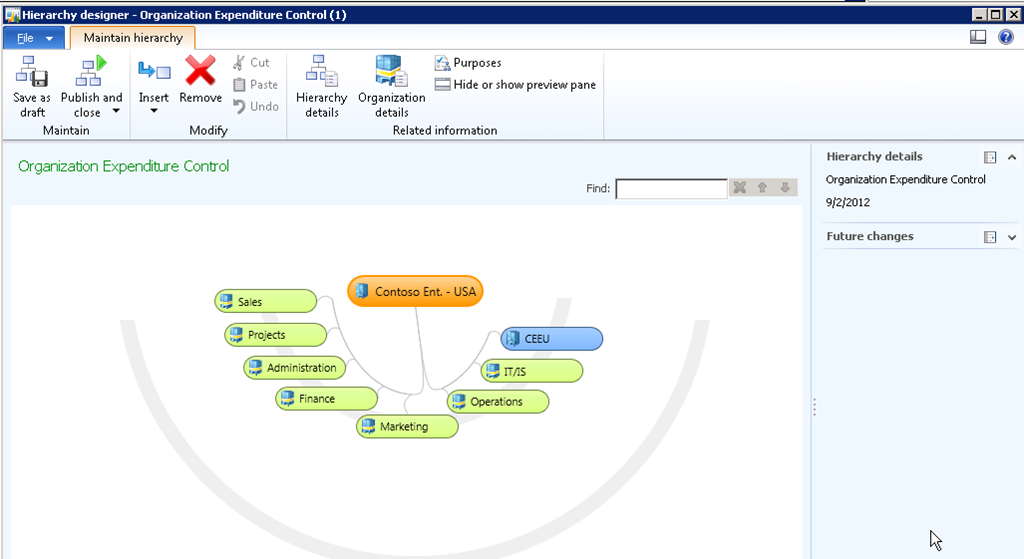
    2. Navigate to Organization administration > Common > Organizations > Organization hierarchies for and follow the steps in my earlier post to create and publish the organization structure. Below diagram shows how the organization structure will look like after this is setup.

    image

    3. Once the organization structure is created and published, the next step is use this is the account structures under GL module.

    4. Navigate to GL > Setup > Chart of accounts > Configure Account structures, and then select the account structure for which you want to set up the hierarchies.

    5. Select the Account structure and click Edit button.

    6. Click Relationships button.

    7. The Select relationships form shows all the organization hierarchies. Notice that the organization hierarchy which we created above is shown and also system shows all possible combinations of hierarchy values based on the setup done in the hierarchy.

    image

    8. Now that we want to control the entry of the cost centers based on selection made for the department dimension, select the record which shows Party A = Department and Party B = Cost center and click Ok button. Note that you can also select multiple relationships here based on your hierarchy needs.

    9. Once the relationship setup is done, Activate the account structure by clicking Activate button.

    10. Let us now create and general journal and see the impact of this relationship setup at the account structure level. Navigate to GL > Journals > General journal.

    11. Create a new journal and click Lines button.

    12. Below diagram shows the account structure we will key in in this financial transaction.

    image

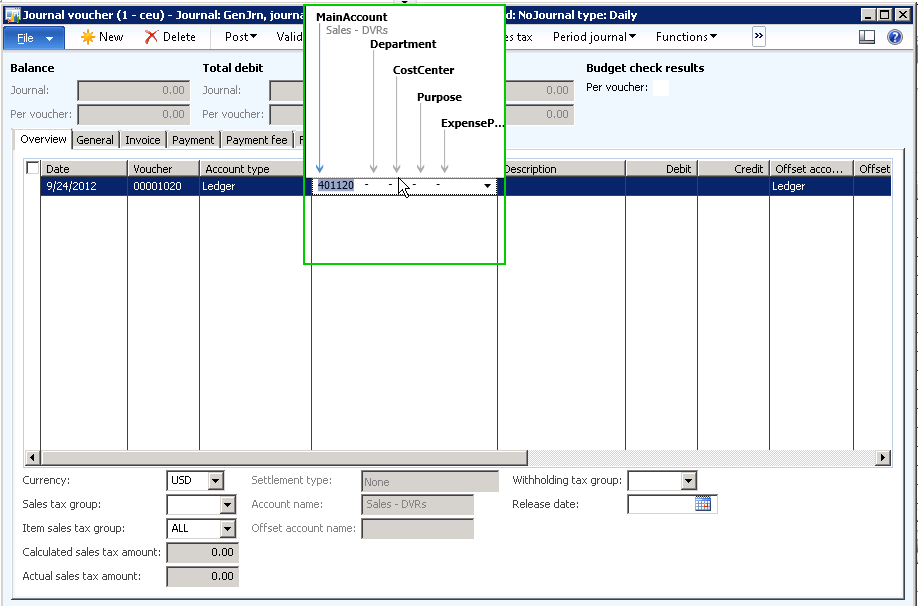
    13. Select a ledger account(Say 401120) and select Department = Administration.

    image

    14. The next segment in the account structure is the Cost center. As soon as you open the drop down for this, notice that system only shows the two cost centers which we have set up in the organization hierarchy. Now, user who is entering the financial transaction, cannot enter erroneous data, as he/she will see only the dimensions which the business wants to be entered. See screen below.

    image

    15. Similarly, notice the the cost centers when we enter Marketing as the Department.

    image

    Simple and easy.

    In few of my upcoming posts I will highlight the areas where the organization hierarchies can be leveraged and used. If you have any queries regarding this, please reach out to me.

    Till next time !!

    Sandeep

  • Prepaid Purchase Orders Management in Microsoft Dynamics AX 2012 – [Vendor Prepayments]

    Vendors asking prepayment for their orders could be a very common scenario as part of their business policies. When this scenario arises, your business/finance team should be able to create a purchase order and create and track a prepayment against this.

    image

    In Microsoft Dynamics AX 2009, it was not possible to make a prepayment related to a purchase order and these were always two separate manual processes. There was no transaction link between the prepayment for a purchase order and the actual purchase order.

    AX 2012 brings in this small yet very useful functionality. In today’s I will explain about this functionality of AX 2012 and how can be used by an organization.

    We will analyze an example where an organization orders 500 items from a vendor and vendor asks for a prepayment as this is a business policy for them. The purchase order prepayment process will basically flow through the below high level steps.

    1. Purchasing agent creates the purchase order and submits a request to AP coordinator to process prepayment.
    2. AP Coordinator/Manager sets up and processes the required prepayment.
    3. Settle the payment against the final invoice.

    Purchasing agent creates the purchase order and submits a request to AP coordinator to process prepayment:

    • Create a new purchase order under Accounts Payable module for vendor 3107, Alpine Electronics. Let us make a note of their balance before we proceed with a prepaid PO processing for them.

    image

    • Create purchase order header and PO line for item(1001) for 600 quantity.

    image

    • Click the Purchase tab and click Prepay > Prepayment button.
    • Enter a suitable description for the prepayment for purchase order and enter the prepayment value. In our case, let us assume that vendor has requested 10% prepayment.
    • Enter 10% and verify that the prepayment remaining value which will be 10% of the total PO value. Note that you can also specify a fixed prepayment amount if vendors requests so.

    image

    Prepayments can be removed after it has been setup on a PO by clicking the Remove prepayment button. if business later cancels the prepayment.

    image

    *Note: The prepayment category ID is the procurement category against which the prepayment will be tracked

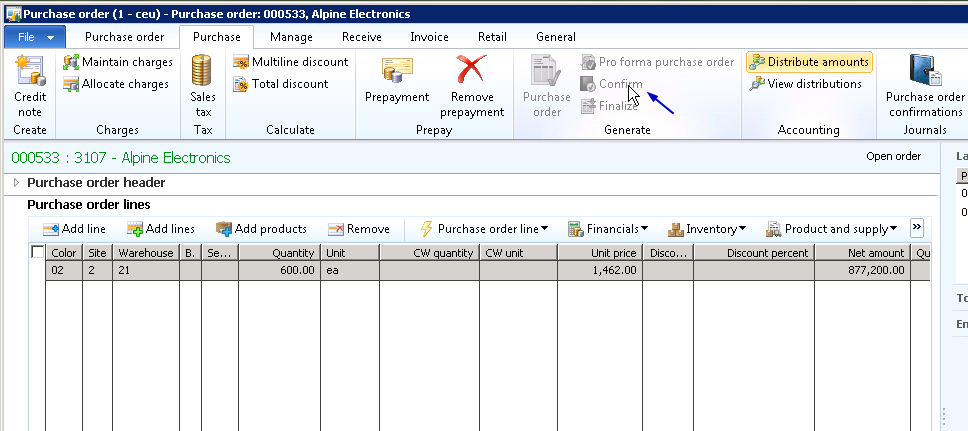
    • Now, Confirm the purchase order after saving the prepayment details.

    image

    Posting the Prepayment Invoice:

    • To do this, click the Invoice tab in the purchase order form and click Prepayment invoice button.

    image

    • Now enter invoice number and click Post > post button to post the prepayment invoice.

    image

    • Note the newly created vendor transaction and also take a note of the affected vendor balance. Recording of the prepayment invoice increases the vendor balance. In this scenario it is $4100.25(Vendor balance before prepayment invoice) + $87,720(Prepayment invoice amount).

    image

    image

    AP Coordinator/Manager processes the required prepayment:

    • It’s now AP Manager’s task to make the payment for the prepayment which was requested for the purchase order.
    • Navigate to AP > Journals > create a new payment journal.
    • Click payment journal line and click Functions > Settlement button and select the prepayment invoice.

    image

    • Print the check for vendor and post the payment. Make a note of the vendor transactions and the affected vendor balance also after this step. Vendor balance decreases after the payment has been made.

    Settle the payment against the final invoice:

    • When the goods arrive and you receive the final invoice from vendor, settle the prepayment with it.
    • Navigate to Purchase order screen > Invoice tab and generate an invoice.
    • Click Apply prepayment button.

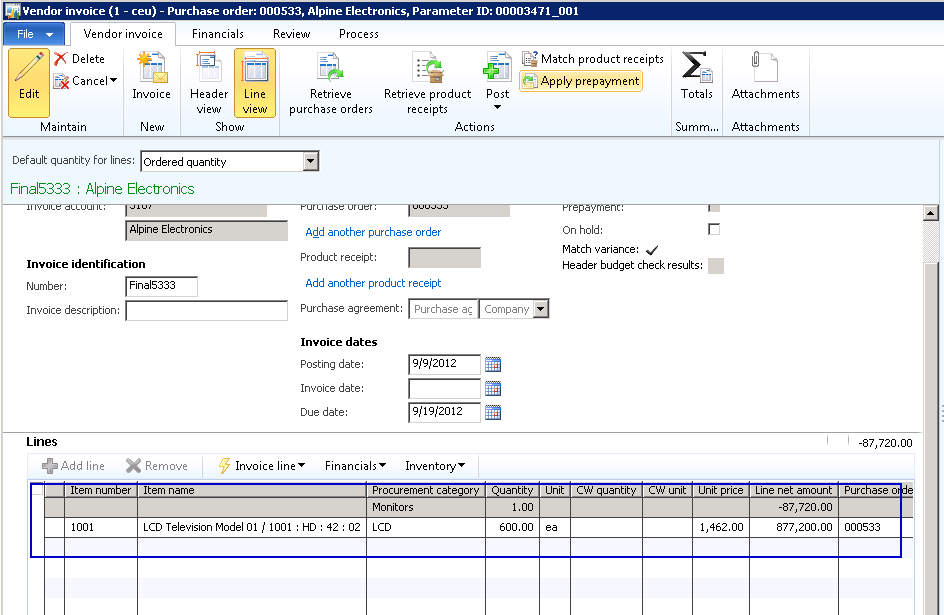
    image

    • You will notice the prepayment record appearing here in this form. The “Select prepayments to apply” grid displays all the prepayments which could exist for the PO.
    • Also notice the invoice amount is $877200 and available application amount is $87,720 which is 10% of the invoice which was paid as a prepayment to the vendor.

    image

    • Finally Select the prepayment and click Apply prepayment button. You will see that the “’Total amount of the prepayment that will be applied to the invoice will be 87720.$.
    • Make a note that one line gets added in the vendor invoice line.

    image

    • Now, Post the purchase order invoice by clicking Post.
    • With the PO invoice posted, let us now analyze the financial voucher and the impact on vendor balance.

    image

    image

    End to end linking of all related transactions and their tracking in an ERP system helps finance and accounting team in a great deal during transaction reconciliations. This also ensures reduction in accounting team’s efforts and time needed to spend in the ERP system.

    Microsoft Dynamics AX 2012 ensures this.

    Pretty straight forward and neat. Smile

    Microsoft Dynamics AX-Powerfully Simple

    Do not hesitate to contact me in case you need any clarifications regarding this.

    Till next time!

    Thanks

    Sandeep

  • Organization Modeling made easy in Microsoft Dynamics AX 2012

    Hi Friends,

    By this time most of us must be already aware of Organization modeling in Dynamics AX 2012. I just wanted to bring in perception of this functionality.

    Microsoft Dynamics AX 2012 brings in another exciting capability which now makes it possible for organizations to manage their organizational structure in more efficient, easy and accurate manner. In AX 2009, it was not possible to define a structure of organizations, as it was possible only to define different company accounts which were pretty much separated from each other.

    In reality, different parts of an organization such as legal entities, departments, business units, cost centers, teams etc. work together and are always dependent on each other in some way. Microsoft Dynamics AX 2012 makes it all possible by introducing a very flexible Organization Model functionality.

    In today’s post we will take a look at the important aspects of this organization modeling and try to understand how this can help organizations in real-time. To begin with, let us first discuss about the different types of organizations which we can create in AX 2012.

    Microsoft Dynamics AX-Powerfully Simple

    Organizations:

    An organization basically signifies a group of people and resources who work together to carry out a defined business process with a mission. We can create two types of organizations in AX 2012.

    • Legal entities : This is an organization which has a registration with a legal authority and can enter into contracts with customers and are required to produce statements that reports their performance. This is similar to a company account which we used in AX 2009.
    • Operating units: An operating unit is a type of organization that is used to distribute economic resources and business processes of the organization. We can create the following types of operating units in AX 2012 out of box.
    1. Business unit
    2. Cost center
    3. Department
    4. Value stream

    Along with these 4 types of operating units, organizations can also create Teams and make it a part of the Organization structure. A team could be referred to group of people who share common responsibilities such as Collections team, AR team, AR team etc..

    Organizational Hierarchies:

    In AX 2012, we can set up a hierarchy of all the organization types. For example we can create a hierarchy of legal entities for tax and statutory reporting.

    We can also create a hierarchy of operating units to report financial information which are required internally within the organization. For example we can create organization purchases to control purchasing policies, budgets and business processes.

    An important point to note here is, all the organizations in a hierarchy can share parameters, policies and transactions. The child organizations can inherit and override the parameters of its parent. Also note that, in AX 2012, the globally master data such as address books, currencies etc. cannot be overridden for individual organizations.

    To be able to create a hierarchy of organizations in AX 2012, we must first define a purpose of this hierarchy. This purpose would define which types of organizations can be included in the hierarchy. There are various hierarchy purposes available out of box in AX 2012 few of which are procurement control, expenditure control, audit internal control etc. You can find more information when you get hands dirty in the system. I would demonstrate a hierarchy by taking the expenditure control purpose into account.

    image

    To create a new organization hierarchy, navigate to Organization administration >  Common > Organizations > Organization Hierarchies.

    Organization Hierarchy

    Configure the organization structure with easy steps by selecting organizations and doing drag and drop.

    Add organizations to Hierarchy

    Please take a look at the screenshot below which shows a sample organization that I have configured.

    image

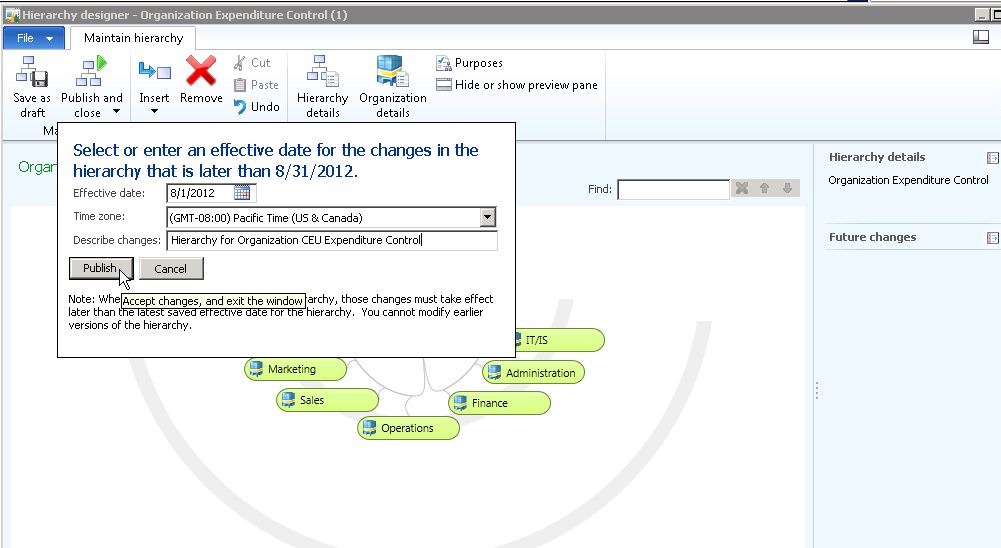
    Publish the organizational structure changes with tracking dates and complete audit histories. You can also publish the hierarchy for a future date.

    Publish Organization Hierarchy

    Now that the organization hierarchy has been published and in effect, you can use it for

    • Defining expense, audit and procurement policies using this hierarchy. This will cause the policy to be effective across this hierarchy.

    image

    • Configure accounting structures and specify organization hierarchy relationships. This will cause to have more control in transaction entry where system will have automatic validations in place for selection of financial dimensions in the transaction line.

    image

    • Helps in organizational data security by configuring legal entities for user rules.

    image

    The new organization model functionality of AX 2012 allows configuring complex organization models without writing additional code and also allows users to easily restructure, as organizational structure needs changes. Microsoft Dynamics AX 2012 grows as your business grow and needs complex organizational structuring for better and tight financial controlling. This makes AX 2012 simply more powerful.

    Let me know if you have any questions regarding the organization modeling in AX 2012. Till next time !!

    Sandeep

  • Tracking and Managing Accounts Receivable Collections made easy with the all new Collections Management module of Microsoft Dynamics AX 2012

    Thanks to Microsoft Dynamics AX 2012 !!!

    The AR Collections team of your organization now has one single interface/screen, where they can see, do everything they need to see and do for their day-to-day work, in collections management.

    image

    Just imagine if you, as a Collections agent/Manager of an organization, doing all the below tasks staying in one single screen with few clicks.

    • Manage collection pools
    • View aging balances for customers.
    • View customer address, contact details and credit rating details.
    • Create Actions, Appointments, Events and Tasks at the open transaction level.
    • Contact and follow-up on payments with customer and add actions/notes for tracking.
    • Trigger interest calculations on pending invoices.
    • Create and process Collection letter journals and interest journals.
    • Reimburse customer over payments.
    • Inquire all transactions of the customer (Open and closed).
    • Maintain collection statuses for individual open invoices such as Not disputed, Disputed, Promised pay, Resolved etc. and maintain suitable reason codes when you change the collection status of a payment.
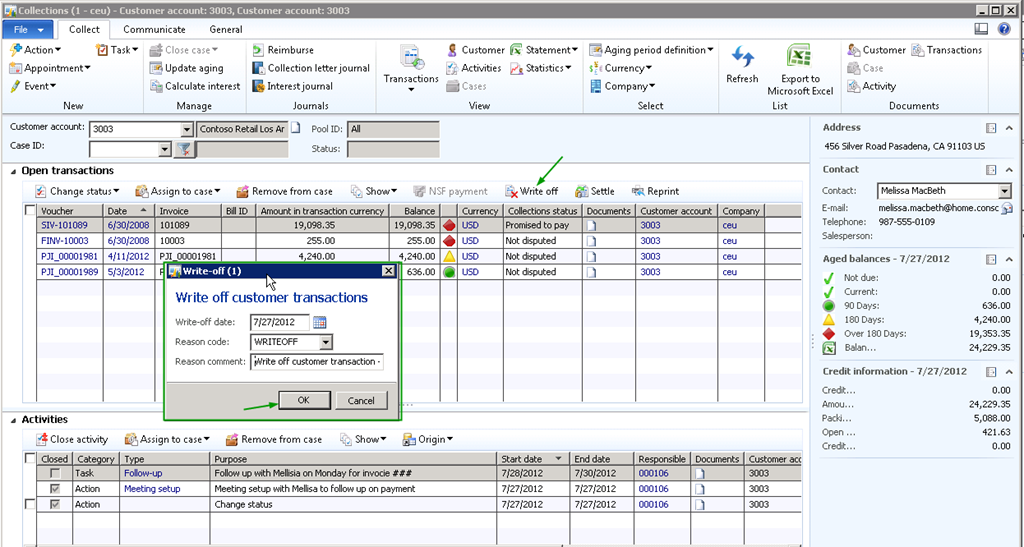
    • Write off open transactions with just one click providing appropriate reason.
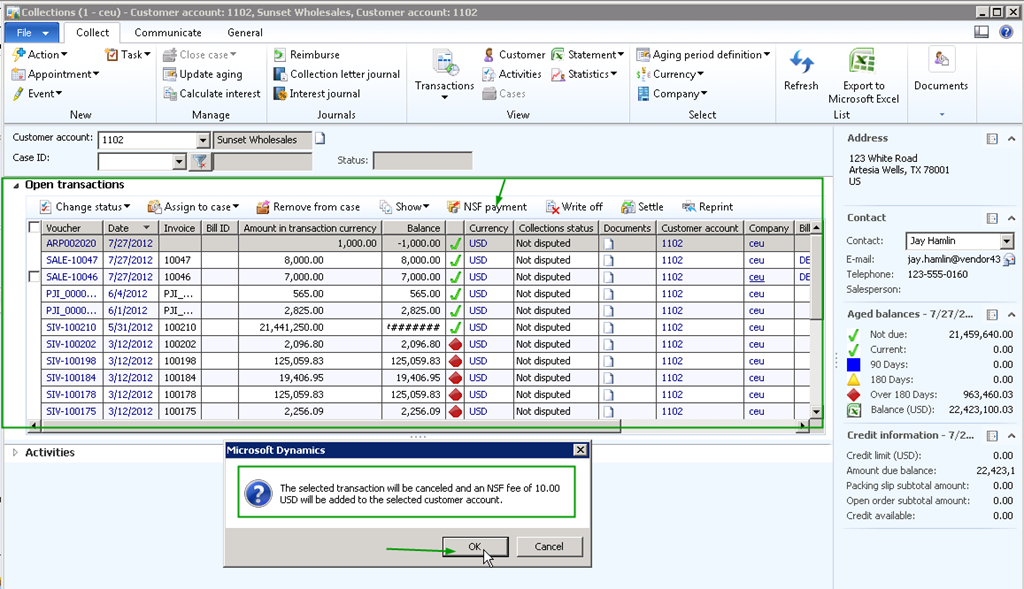
    • Manage NSF payments scenarios with one click.
    • Settle transactions.
    • Reprint invoices and send when talking to customer over phone regarding lost/missing invoices.
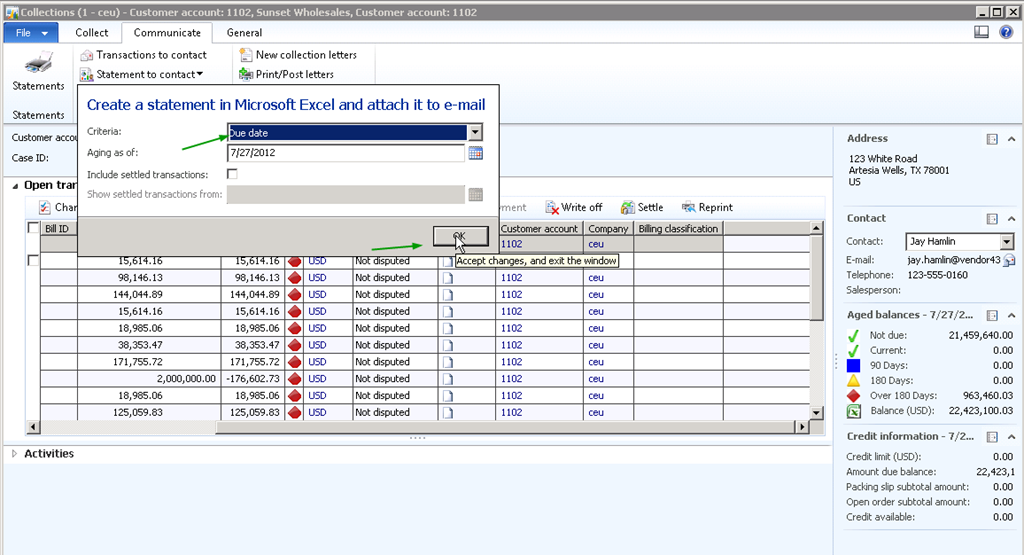
    • Send customer balance details and customer statements by email with just one click.
    • Generate/Print/Post periodic collection letters.
    • Attach appropriate documents such as email confirmation of payments etc., to open transactions when following up on collections.
    • Last but not the least, create and attach cases for the collections with the integrated case management feature of AX 2012.

    POWERFUL ! SIMPLE ! SIMPLE !

    Solutions from Solugenix for Microsoft Dynamics AXimage

    With such exciting new features and functionality getting added over its versions, Microsoft Dynamics AX is betting high in the ERP market.

    In today’s post, I will highlight some of the key functionality and related screens under the Collection Management module of AX 2012. This post will be mainly aimed for customers hunting for the best fit ERP for their organizations and hence will have the overview screens of the overall functionality.

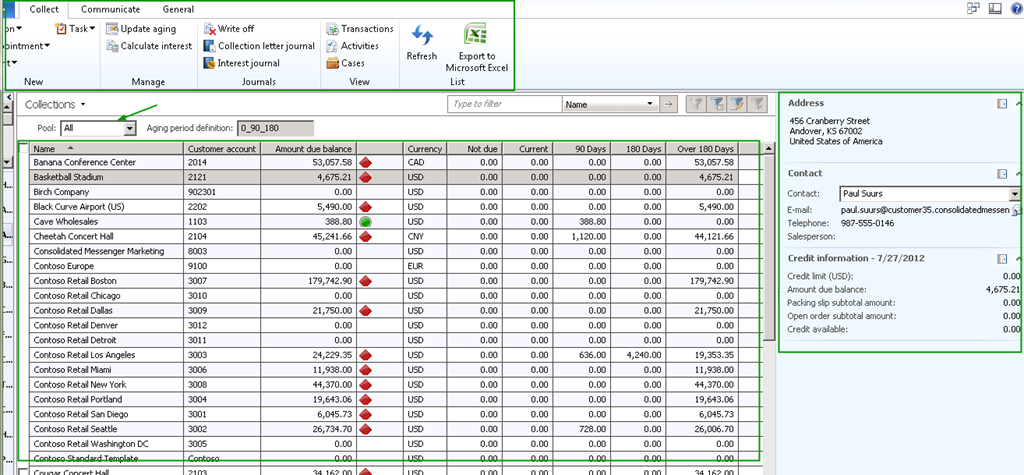
    Collections Management master screen showing the list of customers for the Collection Manager is responsible for, their aging balances, contact and address details and the credit rating details.

    image

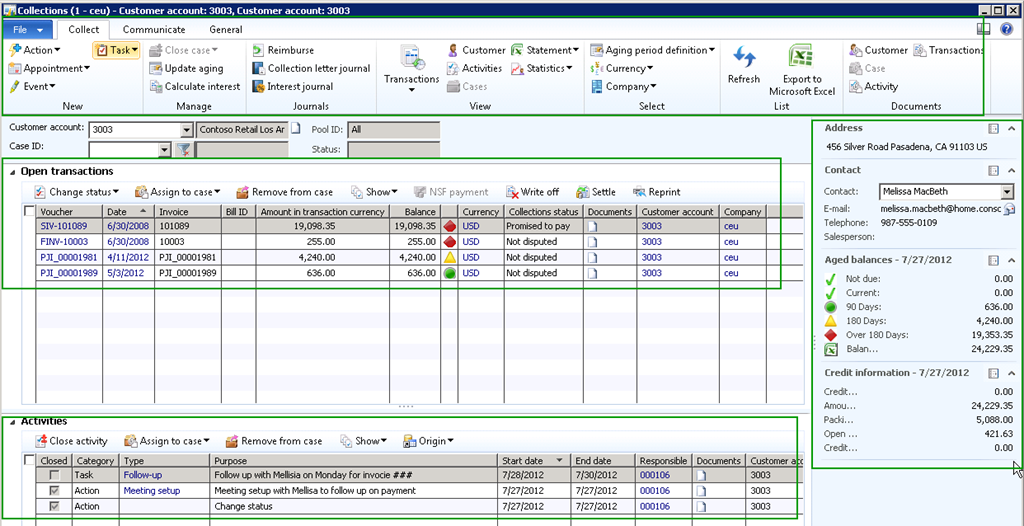
    Collection Manager viewing and doing all open(and Closed) transactions in one screens and having all details required to perform collection activities. Create actions, appointments, Events and tasks:

    image

    Writing off transactions in just a click:

    image

    Settle Transactions:

    image

    Reprint invoices quickly while customers ask a duplicate copy of it, while on a call with Customer,staying in the same screen and just few clicks:

    image

    Manage NSF Payments (Non sufficient Funds):

    image

    image

    Create Collection letters and interest notes and Calculate interests automatically on invoices:

    image

    E-mail customer statements  and balance details to customer contact person with few clicks with seamless integration with outlook:

    image

    image

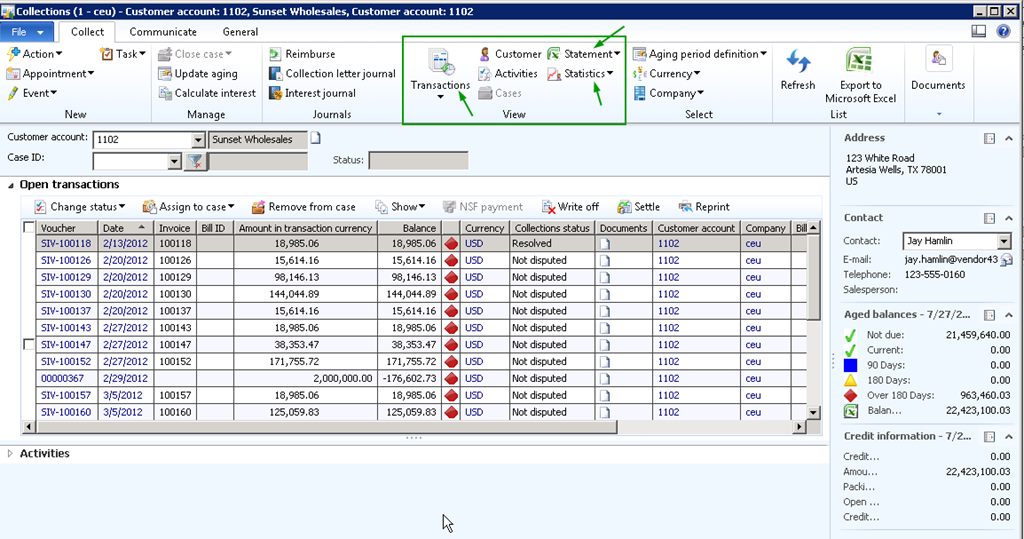
    View transactions, statistics and statements with one click:

    image

    Create and Manage support cases and assign to people directly from collections master with integration to the case management feature:

    image

    With Microsoft Dynamics AX 2012, you can take your business to a whole new level with simplicity. Stay tuned for more such new features.

    If anyone needs more information regarding this, feel free to Contact me.

    Till next time !!!

    Sandeep

  • A business solution from Microsoft—It’s more than just ERP

    A business solution from Microsoft—It’s more than just ERP

    A Microsoft Dynamics family of business solutions always stands apart from just being an ERP and makes your business powerful with simplicity and it becomes agile to work exactly the way your business works.

    Know how a Microsoft Dynamics family of business solutions can help your organization grow and can emerge as an application which is more than just ERP . Read Jennifer’s post at the link below.

    Microsoft Dynamics AX – More than just ERP

    Dynamics AX ERP